Replay and Applied-Parameter Debugging
On this page
- Three Levels of Reproducibility
- Inspect What Happened to One Sample
- Replay One Suspicious Sample
- Log Failed Samples During Training
- Turn Applied Configurations Into a Runnable Probe
- Limitations
- Related Guides
Augmentation pipelines are stochastic by design. That is useful for training, but it can make debugging hard when one sample produces a suspicious prediction, a broken target, or an unusually high loss. Albumentations separates reproducible sequences, exact replay, compact applied-configuration logs, and the runtime parameters from the latest call.
Use this guide when you need to answer: "What exactly happened to this sample, and can I reproduce it?"
Three Levels of Reproducibility
| Tool | What it gives you | Use it when |
|---|---|---|
seed=137 in Compose | A reproducible random sequence for a specific pipeline instance. | You want repeatable experiments, comparable debugging runs, or stable validation preprocessing. |
| ReplayCompose | A replay dictionary that can reproduce the exact sampled augmentation for one input. | You need to rerun the same transformation on a suspicious sample or matching targets. |
save_applied_params=True in Compose | A compact result["applied_transforms"] list with the transforms that ran and their JSON-compatible applied constructor configurations. | You want lightweight per-sample audit logs or a runnable constructor-level probe. |
transform.get_applied_params() | The full runtime parameters from the latest call to one transform instance. | You need fields such as crop coordinates, a transformation matrix, or generated holes immediately after a call. |
A fixed seed controls the sequence produced by a pipeline. Replay captures one concrete draw from that sequence. Applied-configuration logging records which transforms ran and the constructor-valid state they exposed. get_applied_params() inspects one transform's latest call but does not create a persistent replay record.
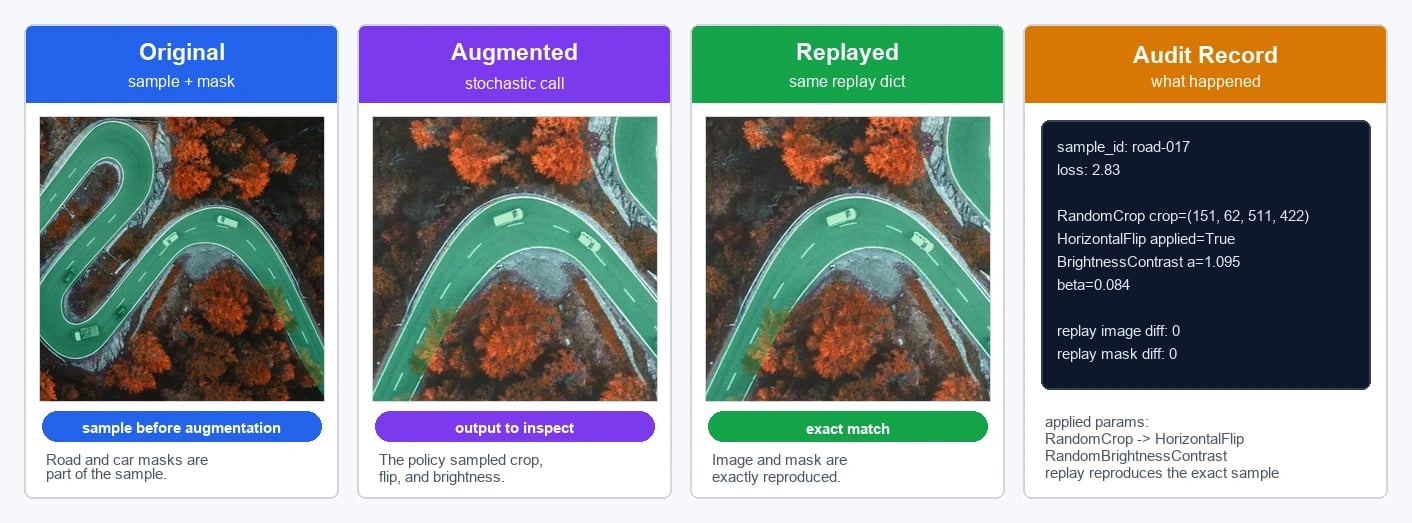
Replay is especially useful when an image has structured targets. The replay record below reproduces both the image pixels and the road/car mask overlay for the same sampled crop, flip, and brightness change.
Inspect What Happened to One Sample
Set save_applied_params=True on Compose. The result dictionary then includes applied_transforms.
import albumentations as A
import numpy as np

image = np.zeros((512, 512, 3), dtype=np.uint8)

transform = A.Compose(
    [
        A.RandomCrop(256, 256, p=1.0),
        A.HorizontalFlip(p=1.0),
        A.RandomBrightnessContrast(p=1.0),
    ],
    save_applied_params=True,
    seed=137,
)

result = transform(image=image)

print(result["applied_transforms"])
# [
#     ("RandomCrop", {"height": 256, "width": 256, "p": 1.0, ...}),
#     ("HorizontalFlip", {"p": 1.0}),
#     (
#         "RandomBrightnessContrast",
#         {
#             "brightness_range": -0.06048900184007305,
#             "contrast_range": -0.10763109776870272,
#             "p": 1.0,
#             ...,
#         },
#     ),
# ]
Each entry contains a canonical transform name and a JSON-compatible configuration that can be passed through the public constructor. Some transforms replace a constructor range with the value sampled for that call, as RandomBrightnessContrast does above. Runtime-only fields such as crop coordinates, dropout masks, and transformation matrices are not copied into applied_transforms.
To inspect those runtime-only fields immediately after a call, read the transform instance:
crop_params = transform.transforms[0].get_applied_params()
print(crop_params["crop_coords"])
# (254, 105, 510, 361)
get_applied_params() describes only the latest call to that transform instance and returns an empty dictionary when the transform was skipped. Copy the values and convert any arrays or matrices to a serializable representation before the next call if you need to retain them. Use ReplayCompose instead when you need a persistent record that reproduces the exact augmentation.
Replay One Suspicious Sample
Use ReplayCompose when you need exact replay of a sampled transformation. It stores a richer result["replay"] dictionary that can be passed back to A.ReplayCompose.replay(...).
import albumentations as A
import numpy as np

image = np.zeros((512, 512, 3), dtype=np.uint8)
mask = np.zeros(image.shape[:2], dtype=np.uint8)

transform = A.ReplayCompose(
    [
        A.RandomCrop(256, 256),
        A.HorizontalFlip(p=0.5),
        A.RandomBrightnessContrast(p=0.5),
    ],
    seed=137,
)

result = transform(image=image, mask=mask)
replay = result["replay"]

# Later, reproduce the same sampled augmentation on the same sample.
reproduced = A.ReplayCompose.replay(replay, image=image, mask=mask)
This is the right tool for investigating one failed sample. Store the replay dictionary next to the sample identifier and model output, then use it to regenerate the exact augmented image and targets for inspection.
Log Failed Samples During Training
For ongoing diagnostics, keep logging lightweight. In a PyTorch-style dataset, return the sample ID and applied_transforms with the augmented data. If your training loop expects tensors, include that conversion in the transform pipeline and return result["image"].
class TrainingDataset:
    def __init__(self, records, transform):
        self.records = records
        self.transform = transform

    def __getitem__(self, index):
        record = self.records[index]
        result = self.transform(image=record["image"])

        return {
            "sample_id": record["id"],
            "image": result["image"],
            "target": record["target"],
            "applied_transforms": result["applied_transforms"],
        }
Use a collate function that keeps metadata as ordinary Python lists, then log suspicious samples after computing the loss:
import torch


loss_fn = torch.nn.CrossEntropyLoss(reduction="none")


def collate_debug_batch(samples):
    return {
        "sample_id": [sample["sample_id"] for sample in samples],
        "image": torch.stack([sample["image"] for sample in samples]),
        "target": torch.tensor([sample["target"] for sample in samples]),
        "applied_transforms": [sample["applied_transforms"] for sample in samples],
    }


debug_rows = []

for batch in train_loader:
    outputs = model(batch["image"])
    per_sample_loss = loss_fn(outputs, batch["target"])

    for sample_id, applied_transforms, loss in zip(
        batch["sample_id"],
        batch["applied_transforms"],
        per_sample_loss.detach().cpu().tolist(),
    ):
        if loss > high_loss_threshold:
            debug_rows.append(
                {
                    "sample_id": sample_id,
                    "applied_transforms": applied_transforms,
                    "loss": loss,
                },
            )
Those (sample_id, applied_transforms, loss) triples let you sort by loss, inspect which transforms ran on failed samples, and look for patterns such as a transform appearing too often or sampled brightness and noise values being too aggressive.
Turn Applied Configurations Into a Runnable Probe
You can reconstruct a Compose pipeline from applied_transforms:
probe_source = A.Compose(
    [
        A.RandomCrop(256, 256),
        A.HorizontalFlip(p=0.5),
        A.RandomBrightnessContrast(p=0.5),
    ],
    save_applied_params=True,
    seed=137,
)
result = probe_source(image=image)

probe = A.Compose.from_applied_transforms(result["applied_transforms"])
probe_result = probe(image=image)
This is useful for quick local probes because the reconstructed transforms run with p=1.0 and use the realized constructor-level values from the original call.
The probe is runnable, but it is not necessarily pixel-identical to the original result. A reconstructed RandomCrop samples a new crop position because applied_transforms does not contain the original crop_coords. For exact reproduction of all runtime parameters, use ReplayCompose.
Limitations
Applied-parameter logs help you inspect behavior; they do not choose a policy automatically. If high-loss samples often contain extreme crops or unrealistic color shifts, the log tells you where to look. You still need to decide whether the policy is appropriate for the task, run ablations, and validate the change on held-out data.
Replay and applied-parameter logging also do not replace versioned pipeline configuration. For experiment auditability, keep the augmentation policy, Albumentations version, Compose seed, DataLoader generator seed, worker settings, and model artifact together.