Creating Custom Albumentations Transforms
On this page
- Motivation
- Quick Reference
- Core Concept: Inheriting from Base Classes
- ⚠️ Important: Default Probability
- 🟢 Step 1: Minimal Image-Only Transform (Essential)
- 🟢 Step 2: Data-Dependent Image-Only Transform (Essential)
- 🟡 Step 3: Handling Multiple Images Efficiently (Intermediate)
- 🟠 Step 4: Geometric Transform Affecting Multiple Targets (Advanced)
- 🟠 Custom Target Routing with apply_to_<key> (Advanced)
- Using Custom Transforms in Pipelines
- 🔴 Advanced Topics
- Where to Go Next?
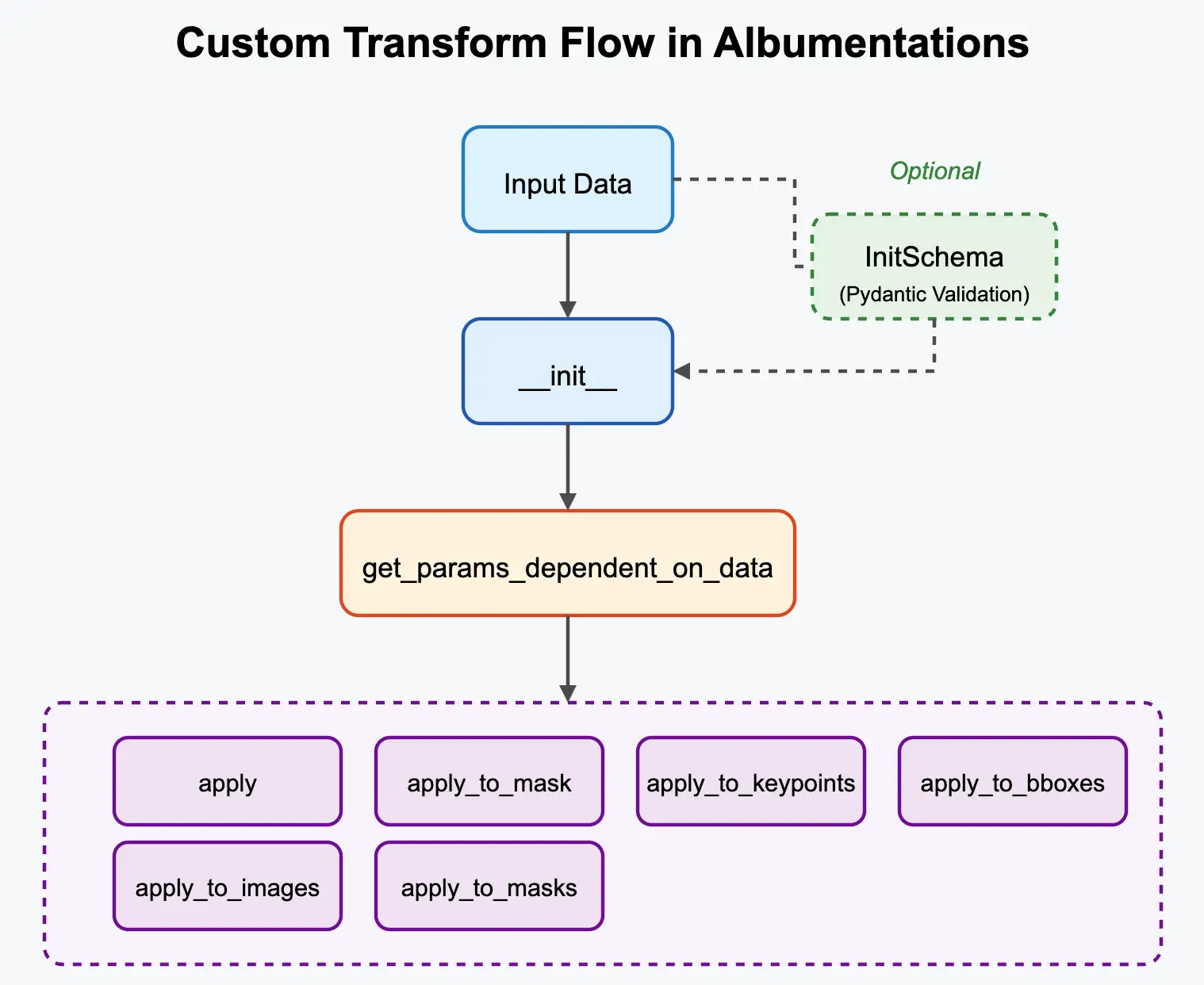
While Albumentations provides a wide array of built-in transformations, you might need to create your own custom logic. This guide walks through the core patterns: choosing a base class, sampling parameters, applying them to one or more targets, validating configuration, and passing custom data.
Motivation
- Implement novel augmentation techniques.
- Create domain-specific transforms.
- Wrap functions from external image processing libraries.
- Encapsulate complex or conditional logic.
Quick Reference
# Base classes: A.ImageOnlyTransform, A.DualTransform, A.Transform3D
# Common overrides: __init__, sample_parameters, apply, apply_to_mask
| Use Case | Base Class | Key Methods |
|---|---|---|
| Change pixels only | ImageOnlyTransform | apply |
| Change image + mask/bboxes/keypoints | DualTransform | apply, apply_to_mask, apply_to_bboxes, apply_to_keypoints |
| Handle 3D volumes | Transform3D | apply_to_volume |
| Route project-specific data | Usually DualTransform | targets, apply_to_<key> |
Core rules:
p=0.5by default; passp=1.0for transforms that should always run.- Sample random values in
sample_parameters, not inapply. - Use
sampling.py_randomorsampling.random_generator, never globalrandomornp.random, soA.Compose(..., seed=...)remains reproducible.
Core Concept: Inheriting from Base Classes
To integrate with Albumentations, custom transforms inherit from base classes like A.ImageOnlyTransform, A.DualTransform, or A.Transform3D. These base classes provide the structure for handling different data targets (image, mask, bboxes, etc.) and probabilities.
⚠️ Important: Default Probability
The BasicTransform class, which all transform classes inherit from, has a default value of p=0.5. This means if you don't explicitly specify the probability parameter in your custom transform's constructor, it will only be applied 50% of the time.
If you want your transform to be always applied, make sure to pass p=1.0 to the parent class constructor:
class MyTransform(A.ImageOnlyTransform):
    def __init__(self):
        # This transform will only be applied 50% of the time
        super().__init__()  # p defaults to 0.5

class MyAlwaysAppliedTransform(A.ImageOnlyTransform):
    def __init__(self):
        # This transform will always be applied
        super().__init__(p=1.0)
🟢 Step 1: Minimal Image-Only Transform (Essential)
Let's start with the simplest case: a transform that only modifies the image pixels and involves some randomness. We'll inherit from A.ImageOnlyTransform.
Goal: Create a transform that multiplies the image pixel values by a random factor between 0.5 and 1.5.
import albumentations as A
from albumentations.core.transforms_interface import ImageOnlyTransform
from albumentations.core.transform_params import SampledParams
import numpy as np

class RandomMultiplier(ImageOnlyTransform):
    """Multiplies the pixel values of an image by a random factor."""

    def __init__(self, factor_range=(0.5, 1.5), p=0.5):
        super().__init__(p=p)
        self.factor_range = factor_range

    def sample_parameters(self, params, data, targets, sampling):
        factor = sampling.py_random.uniform(*self.factor_range)
        return SampledParams(params={"factor": factor})

    def apply(self, img, factor, **params):
        return np.clip(img * factor, 0, 255).astype(img.dtype)

# --- Usage ---
random_mult = RandomMultiplier(factor_range=(0.8, 1.2), p=1.0)

pipeline = A.Compose([
    A.Resize(256, 256),
    random_mult,
], seed=137)
sample_parameters runs once per transform call. Its SampledParams values are passed to apply and any apply_to_* methods through **params. Use the call-local generators (sampling.py_random or sampling.random_generator) so seeded pipelines stay reproducible.
🟢 Step 2: Data-Dependent Image-Only Transform (Essential)
Now, let's create a transform where the parameters calculated depend on the input image itself. We'll still use ImageOnlyTransform as we only modify the image pixels.
Goal: Create a transform that normalizes the image using its per-channel mean and standard deviation.
import albumentations as A
from albumentations.core.transforms_interface import ImageOnlyTransform
from albumentations.core.transform_params import SampledParams
import numpy as np

class PerImageNormalize(ImageOnlyTransform):
    """Normalizes an image using its own mean and standard deviation."""

    def __init__(self, p=1.0):
        super().__init__(p=p)

    def sample_parameters(self, params, data, targets, sampling):
        img = data["image"]
        mean = np.mean(img, axis=(0, 1))
        std = np.std(img, axis=(0, 1))
        std = np.where(std < 1e-6, 1e-6, std)
        return SampledParams(params={"mean": mean, "std": std})

    def apply(self, img, mean, std, **params):
        img = img.astype(np.float32)
        return ((img - mean) / std).astype(np.float32)
Use data["image"] when parameter values depend on the input. Here, the output is float32 because normalization can produce negative and non-integer values.
🟡 Step 3: Handling Multiple Images Efficiently (Intermediate)
ImageOnlyTransform can also receive an images array, for example a video clip or a stack of related frames. Override apply_to_images when the default per-image loop would be slow or semantically wrong.
Goal: Efficiently normalize each image in a sequence/batch using its own mean and standard deviation, while still inheriting from ImageOnlyTransform.
import albumentations as A
from albumentations.core.transforms_interface import ImageOnlyTransform
from albumentations.core.transform_params import SampledParams
import numpy as np

class PerImageNormalizeEfficient(ImageOnlyTransform):
    """
    Normalizes an image or a sequence/batch of images using per-image
    mean and standard deviation. Overrides apply_to_images for efficiency.
    """
    def __init__(self, p=1.0):
        super().__init__(p=p)

    def sample_parameters(self, params, data, targets, sampling):
        params_out = {}
        if "image" in data:
            img = data["image"]
            params_out["mean"] = np.mean(img, axis=(0, 1))
            params_out["std"] = np.std(img, axis=(0, 1))
        elif "images" in data:
            imgs = data["images"]
            params_out["mean"] = np.mean(imgs, axis=(1, 2))
            params_out["std"] = np.std(imgs, axis=(1, 2))
        else:
            return SampledParams(params={})

        params_out["std"] = np.where(params_out["std"] < 1e-6, 1e-6, params_out["std"])
        return SampledParams(params=params_out)

    def apply(self, img, mean, std, **params):
        img = img.astype(np.float32)
        return ((img - mean) / std).astype(np.float32)

    def apply_to_images(self, images, mean, std, **params):
        images = images.astype(np.float32)

        if images.ndim == 4:
            mean = mean[:, np.newaxis, np.newaxis, :]
            std = std[:, np.newaxis, np.newaxis, :]
        elif images.ndim == 3:
            mean = mean[:, np.newaxis, np.newaxis]
            std = std[:, np.newaxis, np.newaxis]

        return ((images - mean) / std).astype(np.float32)
The key difference from Step 2 is that sample_parameters returns one mean/std pair per frame, and apply_to_images reshapes those arrays for vectorized broadcasting.
🟠 Step 4: Geometric Transform Affecting Multiple Targets (Advanced)
This step shows how to implement a custom geometric transform inheriting from A.DualTransform and manually applying the transformation logic. Remember that apply_to_bboxes and apply_to_keypoints receive data in a standardized internal format.
Goal: Create a transform that randomly shifts the image and all associated targets, implementing the target logic manually.
import albumentations as A
from albumentations.core.transforms_interface import DualTransform
from albumentations.core.transform_params import SampledParams
import numpy as np
import cv2

class RandomShiftMultiTargetManual(DualTransform):
    """
    Randomly shifts the image and associated targets (mask, bboxes, keypoints)
    with manual implementation of target transformations, respecting internal formats.
    Processes arrays of bboxes and keypoints.
    """
    def __init__(self, x_limit=0.1, y_limit=0.1,
                 interpolation=cv2.INTER_LINEAR,
                 mask_interpolation=cv2.INTER_NEAREST,
                 border_mode=cv2.BORDER_CONSTANT,
                 fill=0,
                 fill_mask=0,
                 p=0.5):
        super().__init__(p=p)
        self.x_limit = x_limit
        self.y_limit = y_limit
        self.interpolation = interpolation
        self.mask_interpolation = mask_interpolation
        self.border_mode = border_mode
        self.fill = fill
        self.fill_mask = fill_mask

    def sample_parameters(self, params, data, targets, sampling):
        height, width = data["image"].shape[:2]

        dx = sampling.py_random.uniform(-self.x_limit, self.x_limit)
        dy = sampling.py_random.uniform(-self.y_limit, self.y_limit)

        x_shift = int(width * dx)
        y_shift = int(height * dy)
        matrix = np.float32([[1, 0, x_shift], [0, 1, y_shift]])
        return SampledParams(params={
            "matrix": matrix,
            "x_shift": x_shift,
            "y_shift": y_shift,
            "height": height,
            "width": width,
        })

    def apply(self, img: np.ndarray, matrix: np.ndarray, height: int, width: int, **params):
        return cv2.warpAffine(
            img, matrix, (width, height),
            flags=self.interpolation, borderMode=self.border_mode, borderValue=self.fill
        )

    def apply_to_mask(self, mask: np.ndarray, matrix: np.ndarray, height: int, width: int, **params):
        return cv2.warpAffine(
            mask, matrix, (width, height),
            flags=self.mask_interpolation, borderMode=self.border_mode, borderValue=self.fill_mask
        )

    # Correct method name and signature for multiple bounding boxes
    def apply_to_bboxes(self, bboxes: np.ndarray, x_shift: int, y_shift: int, height: int, width: int, **params):
        """
        Applies shift to an array of bounding boxes.
        Assumes bboxes array is in internal normalized format [:, [x_min, y_min, x_max, y_max, ...]].
        Returns bboxes array in the same format.
        """
        # Calculate normalized shifts
        norm_dx = x_shift / width
        norm_dy = y_shift / height

        # Apply shifts vectorized
        bboxes_shifted = bboxes.copy()
        bboxes_shifted[:, [0, 2]] = bboxes[:, [0, 2]] + norm_dx
        bboxes_shifted[:, [1, 3]] = bboxes[:, [1, 3]] + norm_dy

        return bboxes_shifted

    # Correct method name and signature for multiple keypoints
    def apply_to_keypoints(self, keypoints: np.ndarray, x_shift: int, y_shift: int, **params):
        """
        Applies shift to an array of keypoints.
        Assumes keypoints array is in internal format [:, [x, y, angle, scale, ...]] where x, y are absolute pixels.
        Returns keypoints array in the same format.
        """
        keypoints_shifted = keypoints.copy()
        keypoints_shifted[:, 0] = keypoints[:, 0] + x_shift
        keypoints_shifted[:, 1] = keypoints[:, 1] + y_shift

        return keypoints_shifted
🟠 Custom Target Routing with apply_to_<key> (Advanced)
The standard target names route to standard methods:
imageroutes toapplymaskroutes toapply_to_maskbboxesroutes toapply_to_bboxeskeypointsroutes toapply_to_keypoints
For project-specific targets, override the targets property and map your custom key to a method on the transform:
@property
def targets(self):
    return {**super().targets, "camera": self.apply_to_camera}
Every target method receives the same parameters returned by sample_parameters, so image pixels and custom metadata stay synchronized.
This is useful when the target is not just another image, mask, bounding box, or keypoint set. Camera intrinsics are a common example: if a random crop removes pixels from the top or left side of an image, the principal point must move by the same offset.
Goal: Create a random crop transform that crops the image and updates camera intrinsics stored in a plain dictionary. The important part is that apply and apply_to_camera receive the same sampled crop coordinates.
import albumentations as A
from albumentations.core.transforms_interface import DualTransform
from albumentations.core.transform_params import SampledParams
import numpy as np
from typing import Any

class RandomCropWithIntrinsics(A.CustomTransformsApplyMixin, DualTransform):
    """
    Randomly crops an image and updates camera intrinsics that share
    the same sampled crop geometry.
    """

    def __init__(self, crop_height: int, crop_width: int, p: float = 1.0):
        super().__init__(p=p)
        self.crop_height = crop_height
        self.crop_width = crop_width

    def sample_parameters(self, params: dict[str, Any], data: dict[str, Any], targets, sampling):
        image_height, image_width = data["image"].shape[:2]

        if self.crop_height > image_height or self.crop_width > image_width:
            raise ValueError(
                f"Crop size ({self.crop_height}, {self.crop_width}) must be smaller than "
                f"or equal to image size ({image_height}, {image_width})."
            )

        x_min = sampling.py_random.randint(0, image_width - self.crop_width)
        y_min = sampling.py_random.randint(0, image_height - self.crop_height)
        x_max = x_min + self.crop_width
        y_max = y_min + self.crop_height

        return SampledParams(params={
            "x_min": x_min,
            "y_min": y_min,
            "x_max": x_max,
            "y_max": y_max,
        })

    def apply(
        self,
        img: np.ndarray,
        x_min: int,
        y_min: int,
        x_max: int,
        y_max: int,
        **params: Any,
    ) -> np.ndarray:
        return img[y_min:y_max, x_min:x_max]

    def apply_to_camera(
        self,
        camera: dict[str, float],
        x_min: int,
        y_min: int,
        **params: Any,
    ) -> dict[str, float]:
        camera = camera.copy()

        # Cropping changes the coordinate origin. Focal lengths do not change.
        camera["cx"] = camera["cx"] - x_min
        camera["cy"] = camera["cy"] - y_min
        camera["width"] = self.crop_width
        camera["height"] = self.crop_height

        return camera

# --- Usage ---
transform = A.Compose([
    RandomCropWithIntrinsics(crop_height=240, crop_width=320, p=1.0),
], is_check_shapes=False, seed=137)  # camera is metadata, not a spatial array

image = np.zeros((480, 640, 3), dtype=np.uint8)
camera = {
    "fx": 500.0,
    "fy": 500.0,
    "cx": 320.0,
    "cy": 240.0,
    "width": 640,
    "height": 480,
}

result = transform(image=image, camera=camera)

cropped_image = result["image"]
updated_camera = result["camera"]

print(cropped_image.shape)
print(updated_camera)
If the same transform also resizes the crop, update the intrinsics for both operations: subtract the crop origin from cx and cy, then scale fx, fy, cx, and cy by the resize factors. Update width and height to the final output size.
When to Use Standard Targets, additional_targets, or Custom Routing
If an auxiliary array can be treated exactly like a standard target, prefer the standard target path. For example, if you have an image and a depth map but no separate segmentation mask, pass the depth map through the mask argument:
import cv2

transform = A.Compose([
    A.Resize(height=240, width=320, p=1.0),
], mask_interpolation=cv2.INTER_LINEAR, seed=137)

image = np.zeros((480, 640, 3), dtype=np.uint8)
depth_map = np.zeros(image.shape[:2], dtype=np.float32)
result = transform(image=image, mask=depth_map)
resized_depth = result["mask"]
Use additional_targets when the standard slot is already occupied or when preserving a separate semantic key is useful. For example, use additional_targets={"depth": "mask"} when you need to pass both mask=segmentation_mask and depth=depth_map through the same pipeline.
Use custom apply_to_<key> routing when the target has custom semantics: camera intrinsics, calibration records, affine matrices, coordinate-system metadata, crop provenance, invalid-value handling, confidence-specific behavior, or target-specific post-processing.
Using Custom Transforms in Pipelines
Once defined, your custom transform class is used just like any built-in Albumentations transform. Simply instantiate it and add it to your A.Compose list.
🔴 Advanced Topics
Reproducibility and Random Number Generation
To ensure your custom transforms produce reproducible results when a seed is set with A.Compose(..., seed=...), use the call-local random generators passed to sample_parameters: sampling.py_random and sampling.random_generator.
Using Python's global random module or NumPy's global np.random bypasses Albumentations' seeding mechanism. Fixing global seeds outside the pipeline does not guarantee reproducibility inside custom transforms.
Use:
sampling.py_randomfor standard Python-style sampling, for examplesampling.py_random.uniform(a, b).sampling.random_generatorfor NumPy-style sampling, for examplesampling.random_generator.uniform(a, b, size).
For a comprehensive guide, see the Reproducibility Guide.
🟠 Input Parameter Validation with InitSchema
Use InitSchema to validate transform configuration at instantiation time. This is especially useful when parameters are mutually exclusive, constrained to ranges, or must satisfy relationships such as odd kernel sizes.
Define an inner class named InitSchema that inherits from pydantic.BaseModel. Albumentations validates the arguments before the transform is fully initialized.
Albumentations will automatically find and use this InitSchema to validate the arguments when your transform is instantiated.
Example: Mutually Exclusive Parameters
Let's create a hypothetical CustomBlur transform that can apply either a Gaussian blur (requiring sigma) or a Box blur (requiring kernel_size), but not both.
import albumentations as A
from albumentations.core.transforms_interface import ImageOnlyTransform
import numpy as np
import cv2

from pydantic import BaseModel, Field, model_validator

class CustomBlur(ImageOnlyTransform):
    class InitSchema(BaseModel):
        sigma: float | None = Field(default=None, ge=0, description="Sigma for Gaussian blur.")
        kernel_size: int | None = Field(
            default=None,
            ge=3,
            description="Kernel size for Box blur (must be odd).",
        )

        @model_validator(mode="after")
        def check_blur_params(self):
            sigma_set = self.sigma is not None
            kernel_set = self.kernel_size is not None

            if sigma_set and kernel_set:
                raise ValueError("Specify either 'sigma' or 'kernel_size', not both.")
            if not sigma_set and not kernel_set:
                raise ValueError("Must specify either 'sigma' (for Gaussian) or 'kernel_size' (for Box).")
            if kernel_set and self.kernel_size % 2 == 0:
                raise ValueError(f"kernel_size must be odd, got {self.kernel_size}")
            return self

    def __init__(self, sigma: float | None = None, kernel_size: int | None = None, p=0.5):
        super().__init__(p=p)
        self.sigma = sigma
        self.kernel_size = kernel_size

    def apply(self, img: np.ndarray, **params):
        if self.sigma is not None:
            sigma_safe = max(self.sigma, 1e-6)
            return cv2.GaussianBlur(img, ksize=(0, 0), sigmaX=sigma_safe)
        if self.kernel_size is not None:
            return cv2.blur(img, ksize=(self.kernel_size, self.kernel_size))
        return img

transform_gauss = CustomBlur(sigma=1.5, p=1.0)
transform_box = CustomBlur(kernel_size=5, p=1.0)

# These fail during initialization:
# CustomBlur()
# CustomBlur(sigma=1.5, kernel_size=5)
# CustomBlur(kernel_size=4)
This example uses @model_validator for rules that involve multiple fields. Use Field constraints for simple per-field validation.
🟠 Passing Arbitrary Data via targets_as_params
Standard Albumentations targets like image, mask, bboxes, keypoints are handled by the base transform classes. Sometimes you need extra data that is not a transformed output target but is needed to determine augmentation parameters.
Use targets_as_params when the data should influence parameter sampling. It does not automatically transform or return that data. If the same data also needs to be updated and returned, register it as a custom target with apply_to_<key> as shown above.
Examples include:
- Overlay images/masks to be blended onto the main image.
- Metadata associated with the image (e.g., timestamps, sensor readings).
- Paths to auxiliary files.
- Pre-computed model weights or features.
Albumentations provides this using the targets_as_params property.
-
Override
targets_as_params: In your custom transform class, override thetargets_as_paramsproperty. It should return a list of strings. Each string is a key that you expect to find in the input data dictionary passed to theComposepipeline.@property def targets_as_params(self): return ["my_custom_metadata_key", "overlay_image_data"] -
Pass Data to
Compose: When calling the pipeline, include your custom data using the keys defined intargets_as_params.pipeline = A.Compose([ MyCustomTransform(...), ... ]) # Prepare your custom data custom_metadata = {"info": "some_value", "timestamp": 12345} overlay_data = {"image": overlay_img, "mask": overlay_mask} # Pass it during the call result = pipeline( image=main_image, mask=main_mask, my_custom_metadata_key=custom_metadata, overlay_image_data=overlay_data, ) -
Access Data in
sample_parameters: The data you passed (associated with the keys listed intargets_as_params) will be available inside thedatadictionary argument of yoursample_parametersmethod.def sample_parameters(self, params, data, targets, sampling): # Access standard params like shape height, width = params["shape"] # Access your custom data custom_info = data["my_custom_metadata_key"]["info"] overlay_img = data["overlay_image_data"]["image"] # --- Now use this data to calculate augmentation parameters --- # # Example: Decide blur strength based on custom_info if custom_info == "high_detail": blur_sigma = sampling.py_random.uniform(0.1, 0.5) else: blur_sigma = sampling.py_random.uniform(1.0, 2.0) # Example: Process the overlay image (resize, calculate offset, etc.) # (See full OverlayElements example below) processed_overlay_params = self.process_overlay(overlay_img, (height, width)) # Return calculated parameters to be used in apply methods return SampledParams(params={ "blur_sigma": blur_sigma, "processed_overlay": processed_overlay_params }) -
Use Parameters in
apply...Methods: TheSampledParamsreturned bysample_parametersis passed via**paramsto yourapply,apply_to_mask,apply_to_bboxes, etc., methods.def apply(self, img: np.ndarray, blur_sigma: float, processed_overlay: dict, **params): img = apply_blur(img, blur_sigma) return blend_overlay(img, processed_overlay["image"], processed_overlay["offset"]) def apply_to_mask(self, mask: np.ndarray, processed_overlay: dict, **params): return apply_overlay_mask(mask, processed_overlay["mask"], processed_overlay["mask_id"])
Complete Example: AverageWithExternalImage Transform
The following AverageWithExternalImage transform demonstrates passing an external image via a custom key and averaging it with the main input image.
import albumentations as A
from albumentations.core.transforms_interface import ImageOnlyTransform
from albumentations.core.transform_params import SampledParams
import numpy as np
import cv2
from typing import Any

class AverageWithExternalImage(ImageOnlyTransform):
    """
    Averages the input image with an external image passed via `targets_as_params`.
    The external image is resized to match the input image dimensions.
    """

    def __init__(self, external_image_key: str = "external_image", p: float = 0.5):
        """
        Args:
            external_image_key (str): The key used to pass the external image data
                                     when calling the pipeline.
            p (float): Probability of applying the transform.
        """
        super().__init__(p=p)
        self.external_image_key = external_image_key

    @property
    def targets_as_params(self):
        return [self.external_image_key]

    def sample_parameters(self, params, data, targets, sampling):
        external_image = data[self.external_image_key]
        if not isinstance(external_image, np.ndarray):
            raise TypeError(
                f"Expected '{self.external_image_key}' to be a NumPy ndarray, "
                f"got {type(external_image)}"
            )

        target_height, target_width = params["shape"][:2]
        resized_external_image = cv2.resize(
            external_image, (target_width, target_height), interpolation=cv2.INTER_LINEAR
        )

        return SampledParams(params={"resized_external_image": resized_external_image})

    def apply(self, img: np.ndarray, resized_external_image: np.ndarray, **params: Any):
        if img.shape != resized_external_image.shape:
            raise ValueError(
                f"Shape mismatch between image {img.shape} and external image "
                f"{resized_external_image.shape}."
            )

        avg_image = cv2.addWeighted(img, 0.5, resized_external_image, 0.5, 0.0)
        return avg_image.astype(img.dtype)

# --- Example Usage ---
pipeline = A.Compose([
    AverageWithExternalImage(external_image_key="reference_photo", p=1.0),
    # Other transforms...
])

main_image = np.zeros((256, 256, 3), dtype=np.uint8)
reference_photo = np.full((128, 128, 3), 255, dtype=np.uint8)

augmented_data = pipeline(image=main_image, reference_photo=reference_photo)
averaged_image = augmented_data["image"]
Albumentations requires every key listed in targets_as_params to be present in the pipeline call. Use this mechanism when data should influence parameter sampling or intermediate computation; use custom target routing when that data should also be transformed and returned.
Where to Go Next?
Now that you can create your own custom transforms:
- Integrate Your Transform: Add your custom transform to pipelines within the Basic Usage Guides relevant to your task.
- Explore Base Class APIs: Consult the API Reference for details on
ImageOnlyTransform,DualTransform,Transform3D, and other base classes you might inherit from. - Handle Advanced Scenarios: Learn how custom transforms interact with Additional Targets or how they can be included in Serialization.
- Revisit Core Concepts: Ensure your custom transform correctly handles Targets and fits within the Pipeline structure.
- Contribute (Optional): If your transform is broadly useful, consider contributing it back to the Albumentations library (see the project's contribution guidelines).