RGB Input Pipeline Benchmark
Compare RGB JPEG-to-CUDA throughput and peak GPU memory across AlbumentationsX, Pillow, TorchVision, Kornia, and NVIDIA DALI. 57 recipes, 7 execution paths, one selected run.
RGB input pipeline results
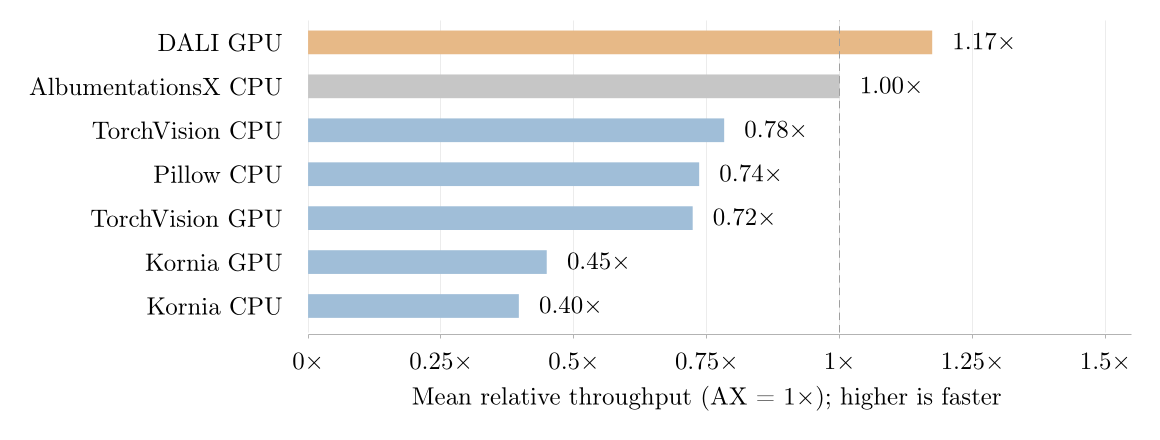
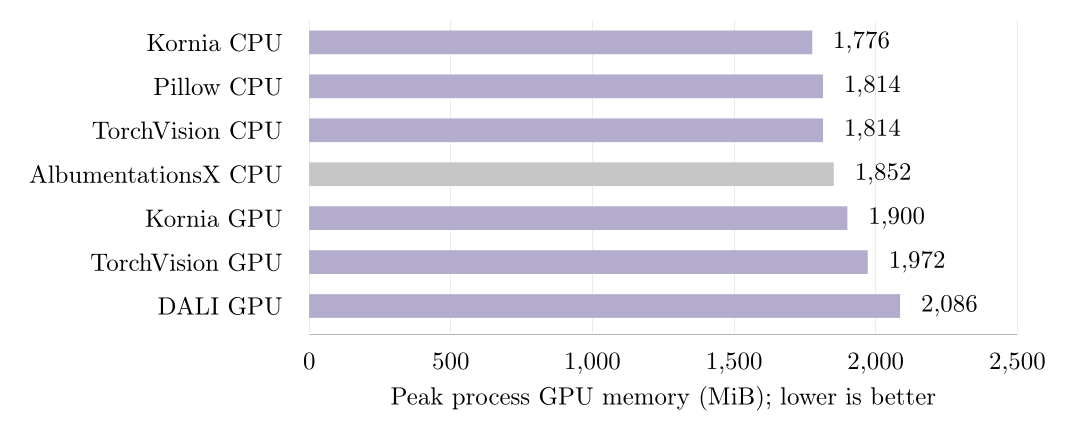
Every path reads RGB JPEGs, prepares the recipe, and delivers a synchronized CUDA batch. CPU and GPU labels identify where augmentation runs; normalization runs on GPU for every path.
| Measured path | Throughput / AX | GPU memory (MiB) |
|---|---|---|
| DALI GPU | 1.17× | 2,086 |
| AlbumentationsX CPU | 1.00× | 1,852 |
| TorchVision CPU | 0.78× | 1,814 |
| Pillow CPU | 0.74× | 1,814 |
| TorchVision GPU | 0.72× | 1,972 |
| Kornia GPU | 0.45× | 1,900 |
| Kornia CPU | 0.40× | 1,776 |
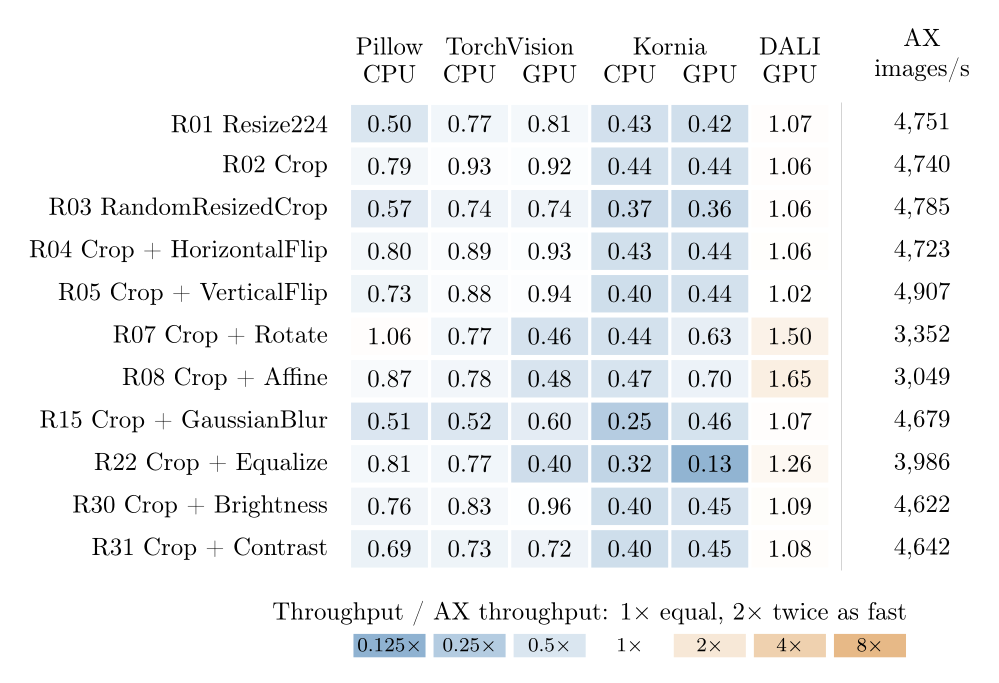
Each comparison uses its own shared recipe set. Averages from different sets cannot rank all libraries. The table below includes every measured recipe for these paths, including recipes outside the summary set. Recipe names are shortened; hover over a name for its full pipeline.
Higher throughput is better. Values are medians across seeds. Hover for the observed range. A dash means no measured result.
| R01Resize224 | 4,751 | 2,390 | 3,671 | 3,852 | 2,063 | 1,990 | 5,070 |
|---|---|---|---|---|---|---|---|
| R02RandomCrop224 | 4,740 | 3,768 | 4,424 | 4,375 | 2,073 | 2,107 | 5,029 |
| R03RandomResizedCrop | 4,785 | 2,721 | 3,518 | 3,558 | 1,776 | 1,746 | 5,091 |
| R04HorizontalFlip | 4,723 | 3,759 | 4,207 | 4,374 | 2,011 | 2,084 | 4,990 |
| R05VerticalFlip | 4,907 | 3,567 | 4,319 | 4,594 | 1,980 | 2,151 | 4,992 |
| R06Pad+RandomCrop224 | 4,397 | 3,659 | 3,685 | 3,626 | — | — | 4,993 |
| R07Rotate | 3,352 | 3,555 | 2,585 | 1,535 | 1,466 | 2,122 | 5,025 |
| R08Affine | 3,049 | 2,647 | 2,384 | 1,478 | 1,445 | 2,138 | 5,031 |
| R09Perspective | 2,879 | — | 2,179 | 886 | 1,303 | — | — |
| R10Elastic | 1,990 | — | 236 | 22 | 102 | 271 | — |
| R11ColorJitter | 3,523 | — | 1,203 | 731 | 1,006 | 2,047 | 5,047 |
| R12ChannelShuffle | 5,026 | — | 4,225 | 4,337 | 1,944 | 2,120 | — |
| R13Grayscale | 5,157 | 3,687 | 3,891 | 4,387 | 1,892 | 2,113 | — |
| R14RGBShift | 4,348 | — | — | — | 1,889 | 2,149 | — |
| R15GaussianBlur | 4,679 | 2,393 | 2,447 | 2,811 | 1,189 | 2,155 | 4,990 |
| R16GaussianNoise | 3,288 | — | — | — | 1,662 | 2,022 | 5,025 |
| R17Invert | 5,076 | 3,540 | 4,067 | 4,430 | 1,920 | 2,167 | — |
| R18Posterize | 5,110 | 3,493 | 4,336 | 4,453 | 1,751 | 2,135 | — |
| R19Solarize | 4,607 | 3,506 | 3,671 | 4,520 | 1,655 | 2,142 | — |
| R20Sharpen | 4,223 | — | 2,117 | 3,239 | 1,241 | 2,144 | — |
| R21AutoContrast | 4,263 | 3,513 | 2,687 | 3,859 | 1,697 | 2,092 | — |
| R22Equalize | 3,986 | 3,245 | 3,064 | 1,591 | 1,265 | 523 | 5,033 |
| R23Erasing | 4,938 | — | 4,010 | 2,907 | 1,558 | — | 5,025 |
| R24JpegCompression | 4,232 | 3,183 | 3,448 | — | 684 | 2,151 | 4,997 |
| R25RandomGamma | 4,969 | — | — | — | 1,686 | 2,114 | — |
| R26PlankianJitter | 4,538 | — | — | — | 1,857 | 2,125 | — |
| R27MedianBlur | 3,805 | 241 | — | — | 124 | 1,015 | — |
| R28MotionBlur | 4,223 | — | — | — | 1,210 | 2,127 | — |
| R29CLAHE | 2,373 | — | — | — | 692 | 104 | 4,840 |
| R30Brightness | 4,622 | 3,519 | 3,823 | 4,434 | 1,872 | 2,101 | 5,041 |
| R31Contrast | 4,642 | 3,198 | 3,377 | 3,333 | 1,868 | 2,092 | 5,025 |
| R32Blur | 4,821 | 3,048 | — | — | 1,284 | 2,147 | — |
| R33ChannelDropout | 4,972 | — | — | — | 1,911 | 2,084 | — |
| R34LinearIllumination | 3,866 | — | — | — | 1,698 | — | — |
| R35CornerIllumination | 4,090 | — | — | — | 1,481 | — | — |
| R36GaussianIllumination | 3,930 | — | — | — | 1,492 | 247 | — |
| R37Hue | 4,274 | — | — | — | 1,126 | 2,100 | 5,047 |
| R38PlasmaBrightness | 2,461 | — | — | — | 469 | 2,083 | — |
| R39PlasmaContrast | 2,162 | — | — | — | 477 | 2,103 | — |
| R40PlasmaShadow | 2,489 | — | — | — | 832 | 2,123 | — |
| R41Rain | 4,069 | — | — | — | 1,455 | 517 | — |
| R42SaltAndPepper | 4,147 | — | — | — | 1,479 | 437 | 5,009 |
| R43Saturation | 4,136 | 3,470 | — | — | 1,124 | 2,083 | 5,047 |
| R44Snow | 3,857 | — | — | — | 1,131 | 2,059 | — |
| R45OpticalDistortion | 3,110 | — | — | — | 1,433 | 2,100 | — |
| R46Shear | 2,658 | 2,550 | — | — | 1,508 | — | 5,052 |
| R47ThinPlateSpline | 858 | — | — | — | 696 | 2,121 | — |
| R48PhotoMetricDistort | 3,369 | — | 1,170 | 670 | — | — | — |
| R49ColorJiggle | 3,526 | — | 1,221 | 742 | 758 | 2,106 | 4,953 |
| R50LongestMaxSize+RandomCrop224 | 3,658 | — | — | — | 1,073 | 1,066 | — |
| R51SmallestMaxSize+RandomCrop224 | 3,221 | — | — | — | 845 | 834 | — |
| R52Transpose | 4,942 | 3,676 | — | — | — | — | — |
| R53RandomRotate90 | 5,002 | — | — | — | 1,462 | 2,106 | — |
| R54RandomJigsaw | 4,662 | — | — | — | 1,751 | 2,117 | — |
| R55EnhanceEdge | 4,389 | 2,601 | — | — | — | — | — |
| R56EnhanceDetail | 4,720 | 2,700 | — | — | — | — | — |
| R57UnsharpMask | 3,120 | 2,132 | — | — | — | — | — |
Measurement setup and limits
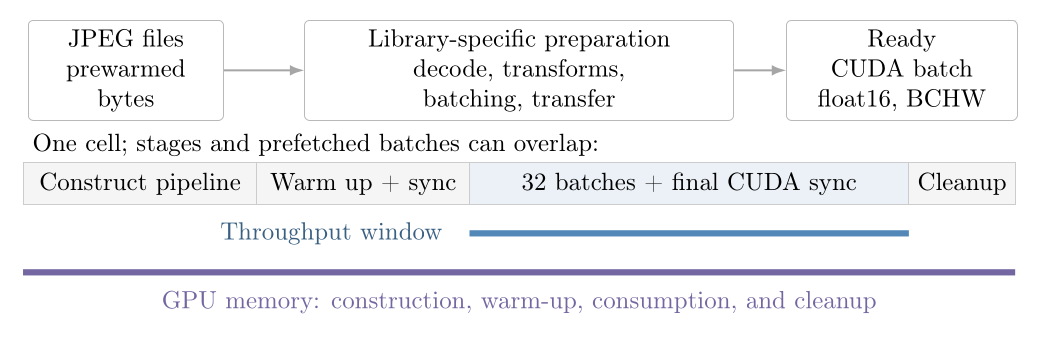
g2-standard-16, nvidia-l4; 10,000 selected ImageNet JPEGs. Batch size 256, 15 workers, prefetch factor 2; persistent workers enabled. Output: cuda float16, BCHW 256×3×224×224.
Seeds: 137, 138, 139. Each observation follows 1 warm-up batch and times 32 batches, ending with CUDA synchronization. Pipeline construction and worker startup are outside throughput timing; prefetch effects remain. JPEG files are prewarmed, so this measures filesystem reads and decoding with a warm page cache.
NVML samples peak process GPU memory every 50 ms, from pipeline construction through final synchronization and cleanup. Brief peaks can be missed. The measurements include no model and do not establish training speed or augmentation quality. Seeds do not guarantee identical augmentation draws across libraries. Observed ranges describe variation between runs; they are not confidence intervals.
In this published run, DALI Crop includes resizing the short side, and DALI Affine omits rotation and shear.
Run 3f8e2e315710528399b8e82e2359ab85c58c809644595b68a92fb9d83492cc8c · 759 measurements · measured source 5fc35f6 · machine-readable results · paper and methodology. This is the run reported in the paper.