Using Additional Targets in Albumentations
On this page
- The Core Idea
- Choose the Right Mechanism
- Mapping Names to Target Semantics
- Examples
- Dynamic Targets with add_targets
- Common Mistakes
- Where to Go Next?
The Core Idea
additional_targets lets you pass extra named inputs to a pipeline and tell Albumentations to treat each one
like an existing target type. The transform parameters are sampled once, then applied consistently to the
standard target and to every additional target.
Use it when your sample has separate named fields that must stay aligned:
- stereo pairs:
imageandright_image - RGB plus depth or thermal data:
imageanddepth - restoration pairs: degraded input and clean target
- multiple named masks:
mask,parts_mask,edge_mask
The key guarantee is that related fields receive one sampled spatial event, not separate random crops or flips.
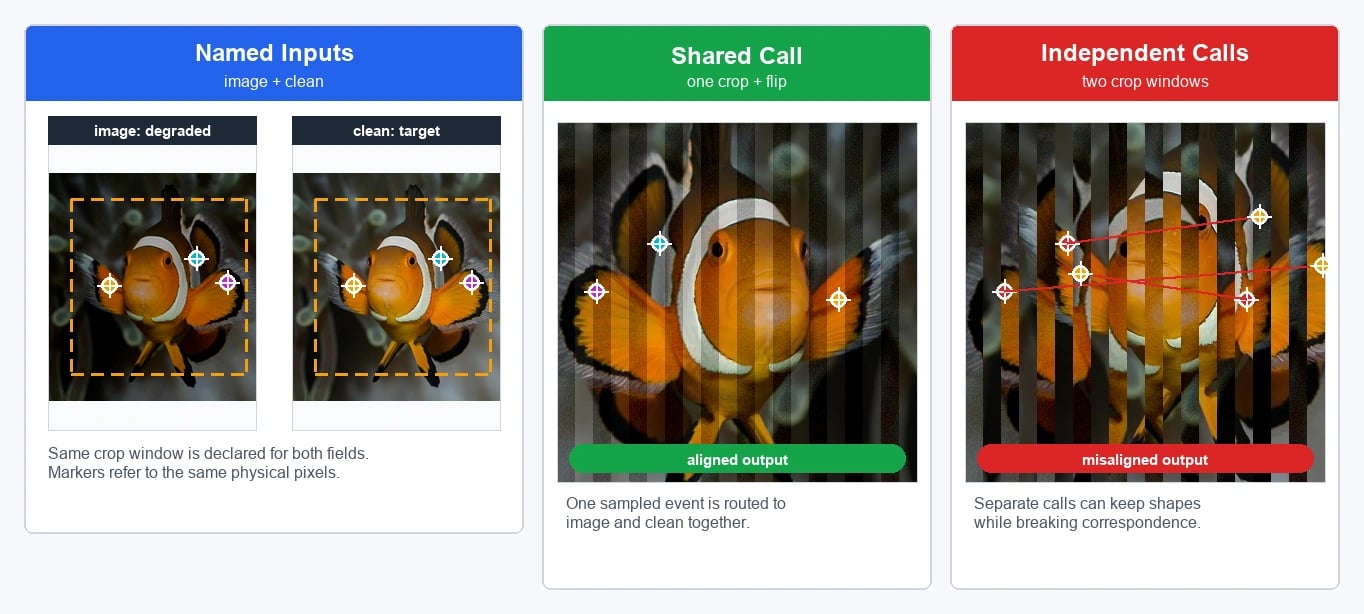
The important choice is the mapping. Mapping a name to image is not the same as mapping it to mask.
That choice controls which transforms affect the target and which interpolation behavior is used.
Choose the Right Mechanism
Albumentations has several ways to handle more than one input. Choose the smallest mechanism that matches your data shape and semantics.
| Situation | Use | Why |
|---|---|---|
| One image plus one standard target | image, mask, bboxes, keypoints | The standard target name is already enough. |
| An unnamed stack or sequence | images, masks, volumes, masks3d | Items share sampled parameters across the first dimension. |
| Separate named arrays in one sample | additional_targets | Each field keeps its own name while reusing standard target behavior. |
| Extra labels for boxes or keypoints | label_fields in bbox_params or keypoint_params | Labels stay synchronized with filtered boxes or keypoints. |
| Custom metadata or geometry | custom apply_to_<key> methods | The target cannot be treated exactly like an image, mask, bbox, or keypoint. |
For example, use images when a single field contains a stack of frames. Use additional_targets when the
sample has separate named fields such as image, right_image, and depth.
Mapping Names to Target Semantics
additional_targets is a dictionary passed to A.Compose:
transform = A.Compose(
    [...],
    additional_targets={"right_image": "image", "depth": "mask"},
    seed=137,
)
The keys are the extra keyword argument names you will pass when calling the pipeline. The values are the standard target types whose behavior should be reused.
| Mapping | Geometric transforms | Pixel/color/intensity transforms | Interpolation behavior | Common use |
|---|---|---|---|---|
"image" | Applied | Applied | Image interpolation | Stereo image, second RGB image, image restoration input |
"mask" | Applied | Skipped | Mask interpolation | Segmentation masks, clean restoration target, depth when you want mask-like routing |
"bboxes" | Applied through bbox processor | Skipped | Coordinate processing | Separate named bbox set |
"keypoints" | Applied through keypoint processor | Skipped | Coordinate processing | Separate named keypoint set |
"volume" | Applied as volume/image-like data | Applied when compatible | Volume/image behavior | Named 3D image-like input |
"mask3d" | Applied as 3D mask-like data | Skipped | 3D mask behavior | Named 3D label volume |
Mapping to image means color jitter, blur, noise, compression, brightness, and other image-only transforms
can affect that target. Mapping to mask means those transforms skip the target, while spatial transforms
still keep it aligned with the image.
This is the main safety rule: map by semantics, not by array shape. A clean image in a restoration pair may
have shape (H, W, C), but if degradation transforms must not touch it, it should usually be routed as
mask or handled in a split pipeline.
For continuous targets such as depth maps or heatmaps, mask-like routing is often useful because it skips color and degradation transforms. However, the default mask interpolation is nearest-neighbor, which is right for categorical masks but often wrong for continuous values. Use an explicit mask interpolation when continuous targets should be interpolated.
Examples
Stereo Pair: Named Image-Like Target
A stereo pair usually needs the same crop, resize, and flip applied to both views. If both images should also
receive the same photometric transform, map the second view to image.
import albumentations as A
import numpy as np

transform = A.Compose(
    [
        A.RandomResizedCrop(size=(256, 512), scale=(0.8, 1.0), p=1.0),
        A.HorizontalFlip(p=0.5),
        A.ColorJitter(p=0.3),
    ],
    additional_targets={"right_image": "image"},
    seed=137,
)

left_image = np.random.randint(0, 256, (300, 600, 3), dtype=np.uint8)
right_image = np.random.randint(0, 256, (300, 600, 3), dtype=np.uint8)

result = transform(image=left_image, right_image=right_image)

aug_left = result["image"]
aug_right = result["right_image"]
Both outputs receive the same sampled geometry. Because right_image is mapped to image, image-only
transforms such as ColorJitter also apply to it.
RGB, Segmentation Mask, and Depth: Named Mask-Like Target
Depth maps usually need the same geometry as the RGB image, but they should not receive RGB color transforms.
Map a named depth target to mask when the invocation also includes a canonical mask. If depth is the only
mask-like target, pass it directly as mask. For continuous depth values, set mask interpolation explicitly.
import cv2
import albumentations as A
import numpy as np

transform = A.Compose(
    [
        A.Resize(height=256, width=256, p=1.0),
        A.HorizontalFlip(p=0.5),
        A.RandomBrightnessContrast(p=0.3),
    ],
    additional_targets={"depth": "mask"},
    mask_interpolation=cv2.INTER_LINEAR,
    seed=137,
)

image = np.random.randint(0, 256, (300, 300, 3), dtype=np.uint8)
segmentation_mask = np.random.randint(0, 4, (300, 300), dtype=np.uint8)
depth = np.random.rand(300, 300).astype(np.float32)

result = transform(image=image, mask=segmentation_mask, depth=depth)

aug_image = result["image"]
aug_segmentation_mask = result["mask"]
aug_depth = result["depth"]
The RGB image can receive brightness and contrast changes. The depth map receives the same resize and flip, but not the brightness or contrast transform.
For categorical masks, keep nearest-neighbor interpolation. For continuous targets such as depth or heatmaps, choose interpolation deliberately based on what the values mean.
Restoration Pair: Degrade Input, Preserve Clean Target
In denoising, deblurring, compression removal, and similar restoration tasks, the clean target must stay
geometrically aligned with the degraded input but should not receive the degradation transforms. Pass the clean
target through the canonical mask slot when the pipeline contains image-only degradation transforms.
import albumentations as A
import numpy as np

transform = A.Compose(
    [
        A.RandomCrop(height=256, width=256, p=1.0),
        A.HorizontalFlip(p=0.5),
        A.GaussNoise(std_range=(0.05, 0.12), p=1.0),
        A.GaussianBlur(blur_range=(3, 5), p=0.5),
    ],
    seed=137,
)

clean_image = np.random.randint(0, 256, (320, 320, 3), dtype=np.uint8)

result = transform(image=clean_image, mask=clean_image)

degraded_input = result["image"]
clean_target = result["mask"]
The crop and flip are shared. Noise and blur affect only image, so clean_target remains clean and aligned.
If your restoration pipeline includes resizing, rotation, or warping, decide whether mask interpolation is
acceptable for the clean target or whether a split pipeline is clearer.
Multiple Named Masks
Use additional_targets when masks have different meanings and should keep separate names.
import albumentations as A
import numpy as np

transform = A.Compose(
    [
        A.RandomCrop(height=128, width=128, p=1.0),
        A.HorizontalFlip(p=0.5),
        A.RandomBrightnessContrast(p=0.3),
    ],
    additional_targets={"parts_mask": "mask", "edge_mask": "mask"},
    seed=137,
)

image = np.random.randint(0, 256, (160, 160, 3), dtype=np.uint8)
semantic_mask = np.random.randint(0, 5, (160, 160), dtype=np.uint8)
parts_mask = np.random.randint(0, 3, (160, 160), dtype=np.uint8)
edge_mask = np.random.randint(0, 2, (160, 160), dtype=np.uint8)

result = transform(
    image=image,
    mask=semantic_mask,
    parts_mask=parts_mask,
    edge_mask=edge_mask,
)
All masks receive the same crop and flip. Only the image receives brightness and contrast changes.
Dynamic Targets with add_targets
Use add_targets when you need to add target mappings after constructing a pipeline. This is useful when a
pipeline is created by shared code and target names are known later.
import albumentations as A
import numpy as np

transform = A.Compose([A.VerticalFlip(p=1.0)], seed=137)
transform.add_targets({"image2": "image", "mask2": "mask"})

image = np.random.randint(0, 256, (100, 100, 3), dtype=np.uint8)
image2 = np.random.randint(0, 256, (100, 100, 3), dtype=np.uint8)
mask = np.random.randint(0, 2, (100, 100), dtype=np.uint8)
mask2 = np.random.randint(0, 2, (100, 100), dtype=np.uint8)

result = transform(image=image, image2=image2, mask=mask, mask2=mask2)
Prefer declaring additional_targets in A.Compose when the mapping is known upfront; it keeps the pipeline
configuration easier to inspect, serialize, and review.
Common Mistakes
- Mapping a clean target to
imagein a degradation pipeline. Image-only transforms such as noise, blur, compression, and color jitter will affect it. Usemaskrouting or split the pipeline. - Mapping continuous targets to
maskwithout thinking about interpolation. Nearest-neighbor interpolation preserves class IDs, but it may be wrong for depth, heatmaps, or dense regression targets. - Using
additional_targetsfor an unnamed sequence. If the input is a stack of frames or masks, prefer plural targets such asimagesormasks. - Using
additional_targetsfor custom metadata. Camera intrinsics, calibration matrices, crop provenance, or domain-specific annotations usually need customapply_to_<key>routing. - Forgetting processors for coordinate targets. Mappings to
bboxesandkeypointsstill requirebbox_paramsandkeypoint_params, including any neededlabel_fields. - Reusing a standard target name. Additional target names must not clash with reserved names such as
image,mask,masks,bboxes,keypoints,volume,volumes,mask3d, ormasks3d.
Where to Go Next?
- Working with Targets: Understand target semantics and what "supported" means.
- Pipelines: Review
A.Compose, validation, seeds, and target configuration. - Video Augmentation: Use plural
imagesfor frame stacks. - Volumetric Augmentation: Use
volume,volumes,mask3d, andmasks3d. - Creating Custom Transforms: Add custom
apply_to_<key>routing when standard target behavior is not enough. - Serialization: Save and load pipelines that include
additional_targets.