Benchmark Methodology
On this page
- Measurement Regimes
- Scenarios And Library Sets
- Run Configuration
- Transform Selection
- Environment Isolation
- Media Loading
- Micro Timing
- DataLoader Pipeline Timing
- GPU Pipeline Timing
- DALI Pipeline Timing
- Slow-Transform Guard
- Result Metadata And Statistics
- Claim Interpretation
- Reproducing Results
This page explains what Albumentations benchmark numbers measure, what they deliberately exclude, and how to interpret them. The benchmark is designed around one rule: compare libraries inside explicit, reproducible measurement scopes instead of merging incompatible claims.
A primitive transform profiler, a CPU DataLoader pipeline, a GPU batch pipeline, and a DALI graph answer different questions. The benchmark keeps those regimes separate, records the scope in result metadata, and expects charts, tables, and papers to preserve that separation.
Speedup plots follow the same rule. A plotted ratio compares one transform inside one named regime against the best matched competitor row for that same transform and regime. Unsupported and early-stopped rows remain visible as coverage and practicality evidence, but they are not converted into speed ratios.
For training-style input throughput, the relevant path is the one that prepares ready batches while the accelerator works on the current batch. Healthy training keeps preparation shorter than the model step. A longer worker path eventually drains the ready queue; fast augmentation helps keep that path inside the available time budget. This is why the benchmark reports DataLoader regimes separately from isolated primitive transform timings.
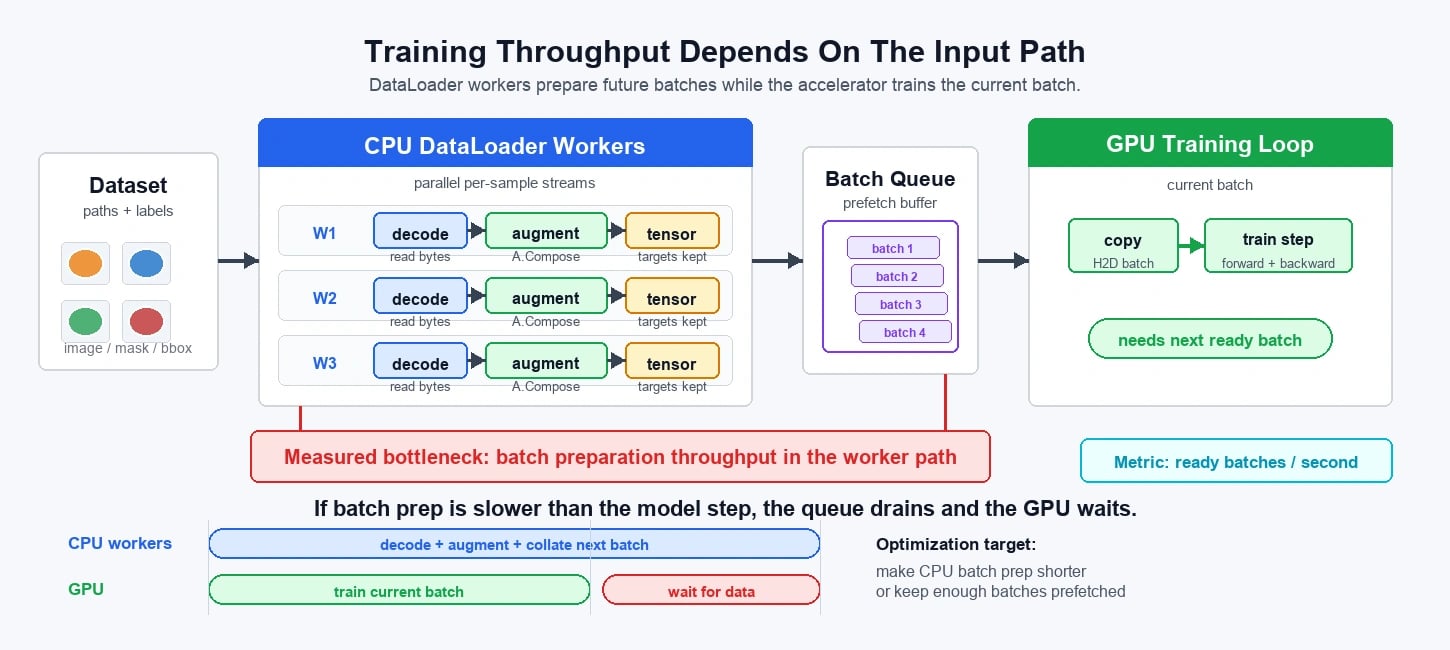
The public benchmark source lives in the albumentations-team/benchmark repository.
Measurement Regimes
The benchmark matrix separates scenario, mode, device, and backend before timing begins.
| Regime | What it answers | What it does not answer |
|---|---|---|
| Micro transform timing | How expensive one transform implementation is after data is already decoded and represented in the library's native format. | End-to-end training input throughput, disk I/O, file decode, collation, or model-side cost. |
CPU DataLoader pipeline timing | How fast a training-style input recipe runs through workers, augmentation, collation, normalization, and tensor conversion. | Pure per-transform implementation cost. |
| GPU pipeline timing | Whether accelerator-side augmentation is worthwhile once transfer, synchronization, randomness semantics, and memory use are part of the measured path. | A direct replacement for CPU micro timing. |
| DALI pipeline timing | How DALI behaves as a native graph-based decode and preprocessing pipeline. | Python-library micro transform speed. |
Do not combine rows from these regimes into one leaderboard. A statement about primitive transform speed should come from micro rows. A statement about training input throughput should come from DataLoader rows. A statement about GPU augmentation should name transfer, synchronization, per-sample randomness, and peak memory when those are included.
Scenarios And Library Sets
The public benchmark matrix defines three main scenario families:
- RGB images: AlbumentationsX, torchvision, Kornia, and Pillow where each library has a meaningful direct implementation.
- 9-channel images: AlbumentationsX, torchvision, and Kornia. Pillow is excluded because its practical direct API is RGB/PIL-image oriented.
- Fixed-length video clips: AlbumentationsX, torchvision, and Kornia, with DALI available only in separately labeled native-pipeline scopes.
RGB image benchmarks are the default evidence for ordinary computer-vision training pipelines. The 9-channel benchmark is the relevant evidence for satellite, medical, hyperspectral, microscopy, and sensor-fusion workloads. Video benchmarks are interpreted separately because video rows have different data shape, memory, and device tradeoffs.
Run Configuration
Benchmark execution starts from a checked-in YAML config. The runner resolves and validates that config, expands named transform sets, applies supported CLI overrides, and writes the resolved config into the output directory. Each run therefore has an inspectable contract before timing begins.
The resolved config expands into immutable jobs. A job records the library, scenario, mode, media type, transform filter, data directory, output file, worker settings, batch size, thread policy, device option, slow-transform policy, and backend. Scenario support, library support, device support, requirement groups, transform-set files, pipeline scopes, and backend names are centralized in the benchmark matrix rather than decided ad hoc by the CLI.
Transform Selection
The shared transform catalog maps library-specific APIs onto canonical transform behavior and parameters. Paper transform sets are fixed files in the benchmark repository, and the expanded transform set is stored in run metadata so a result can be traced back to its exact transform universe.
A transform belongs in a scenario-level paper set only when it exists in at least two selected libraries for that scenario. This avoids turning the benchmark into a catalog-size contest where one library is penalized for implementing operations that no other competitor exposes.
Missing support is recorded as unsupported or absent coverage. It is not treated as fast, and it is not counted as zero throughput. Unsupported rows are coverage evidence, not speed evidence.
The benchmark does not recreate missing library features with large compatibility implementations just to fill a table cell. Substantial helper code can dominate the measured path and make a library look slow for reasons unrelated to the library itself.
Environment Isolation
Each library or compatible library group runs in an isolated virtual environment. This matters because Python library benchmarks are sensitive to transitive dependency versions, compiled extension availability, CUDA bindings, and import-time side effects.
Requirements are declared in the benchmark repository and installed into environment groups. Dependency installation is cached by resolved requirement contents, Python version, media type, and environment group, so repeated runs reuse the same dependency contract unless it changes.
Media Loading
Micro benchmarks preload the requested number of images or video clips once per library before timing transform rows. Image samples use the library-native loader selected by shared media helpers. Nine-channel samples are synthesized from the same input paths by wrapping the image loader with a multichannel loader. Video micro samples are decoded as fixed-length clips, so a video-16f run preloads 16-frame clips rather than timing full source-video traversal.
Preloading is deliberate in micro mode. A micro transform row should not reread files from disk, decode media, normalize, convert to tensor, or repair channel layouts unless that work is part of the named library transform itself.
Pipeline mode uses a different data model:
decode_dataloader_augmentstores paths and loads or decodes inside theDataLoaderpath.memory_dataloader_augmentpreloads decoded samples once and measures worker scheduling, augmentation, collation, and recipe execution without disk or decode cost.decode_dataloader_augment_batch_copyadditionally materializes the collated batch tensor and copies it to CUDA or MPS when a device is requested.
These scopes answer different production questions and should remain separate in analysis.
Micro Timing
Production micro timing uses pyperf. The runner applies the micro-single thread policy before measurement so it measures one augmentation stream instead of hidden library fan-out. This is the relevant primitive number for DataLoader-style training, where many workers scale by process and each worker effectively consumes a CPU core.
Each micro subprocess lazily constructs only the transform being measured. The timed loop applies the transform to every preloaded item for the selected number of loops. The runner synchronizes the selected device before and after the loop.
Outputs are materialized inside the timed section. Pillow images are forced through contiguous NumPy conversion, tensor-like outputs are made contiguous, and lazy or view-like results are not allowed to count as finished work before the underlying computation is realized.
GPU image micro rows are device-resident profilers for torchvision and Kornia. Samples and transforms move to CUDA, MPS, or the automatically resolved accelerator before timing starts. The timed loop includes device synchronization but does not include host-to-device transfer, so GPU micro rows are not end-to-end input-pipeline measurements.
DataLoader Pipeline Timing
Pipeline benchmarks measure recipe throughput using a PyTorch DataLoader path. For non-crop image transforms, the recipe is random crop, measured transform, normalization, and tensor conversion. For crop transforms, the crop itself replaces the fixed random crop. Video pipeline specs follow the same idea with clip-shaped data.
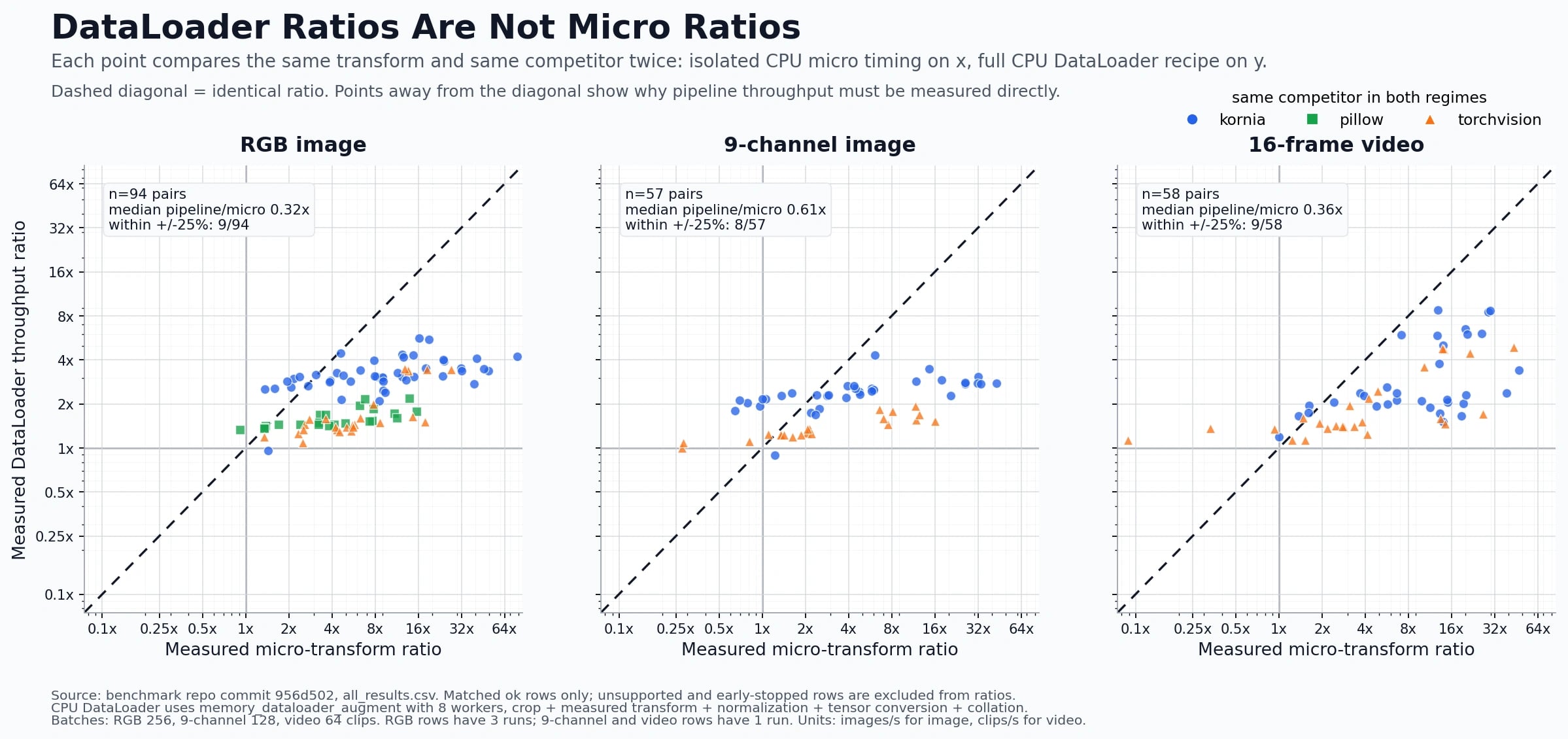
The fixed recipe steps are part of the measured workload. A DataLoader throughput row includes the fixed crop for non-crop transforms, the measured transform, normalization, tensor conversion, default collation, and any scope-specific decode or device-transfer work.
The runner records batch size, worker count, minimum run time, minimum batches, thread policy, media type, scenario, device option, and pipeline scope. It warms the DataLoader path once before timed runs. Each timed run builds a fresh DataLoader, iterates until both the minimum time and minimum batch constraints are satisfied, materializes produced batches, synchronizes the selected device, and stores throughput in items per second.
The figure below compares isolated micro ratios with DataLoader ratios for the same transform and the same competitor. Points away from the diagonal show that micro timing cannot be used as a shortcut for the pipeline row.
GPU Pipeline Timing
GPU image pipeline rows are separate from CPU pipeline rows. For torchvision and Kornia, DataLoader workers prepare fixed-shape samples on CPU before collation. The collated batch is then copied to the selected device, the measured augmentation and normalization run on the accelerator, and the benchmark synchronizes before stopping the timer.
Kornia can apply batched augmentation with per-image random parameters using same_on_batch=False, so its GPU batch path uses the batched transform. Torchvision v2 does not expose an equivalent batched random-transform API for every operation in this benchmark, so the torchvision GPU image path applies the measured augmentation in a per-sample loop and then normalizes the whole batch.
CUDA DataLoader rows also record peak allocated and reserved memory during timed runs. GPU augmentation consumes accelerator memory that could otherwise be used by the model, optimizer, activations, or a larger batch, so memory is part of the production tradeoff.
DALI Pipeline Timing
DALI is treated as a native pipeline backend, not as another micro transform spec. DALI graph execution, mixed decode, pipeline scheduling, and batch production are different from a Python function that transforms one already-decoded sample.
When DALI is included, it must be labeled as a DALI pipeline row with its own supported subset and unsupported results. The benchmark consumes produced batches so lazy graph scheduling is not mistaken for completed augmentation work.
Slow-Transform Guard
Both micro and pipeline timing engines run a preflight before spending the full benchmark budget on a transform unless slow skipping is explicitly disabled. If the preflight shows that the transform is below the practical throughput floor, or if the preflight itself exceeds the maximum allowed duration, the result is recorded as an early-stopped row with the preflight throughput and reason.
Early-stopped rows remain visible in output data. They are not silently dropped. The guard prevents one or two impractically slow rows from dominating wall time and blocking the rest of a full benchmark sweep.
Result Metadata And Statistics
Every result JSON records metadata needed for interpretation: system information, library versions, thread settings, environment and git state, GPU snapshot, dataset fingerprint, timing backend, measurement scope, data source, decode inclusion, collation inclusion, host-to-device transfer inclusion, worker inclusion, scenario, mode, library or decoder, benchmark parameters, and the resolved run config payload when available.
Per-transform results store the raw throughputs and times that contributed to the summary. They also store median, mean, standard deviation, coefficient of variation, approximate 95 percent confidence interval, percentile throughput values, number of successful runs, and an unstable flag when variation exceeds the configured threshold.
A throughput number without measurement scope, device, worker count, batch size, dependency versions, thread policy, and dataset fingerprint is not enough to support a claim. The benchmark records those facts at execution time so downstream figures and writing can defend the comparison.
Claim Interpretation
Use these rules when citing benchmark results:
- Name the regime: micro, CPU
DataLoader, GPUDataLoader, or DALI pipeline. - Name the scenario: RGB image, 9-channel image, fixed-length video, or another explicit scenario.
- Keep unsupported rows visible as coverage information.
- Do not count unsupported rows as zero throughput.
- Do not compare DALI graph rows to micro transform rows.
- Prefer aggregate win counts and median speedups over cherry-picked per-transform outliers.
- Treat RGB, multichannel, video, CPU pipeline, GPU pipeline, and DALI results as separate evidence unless the argument is explicitly about the difference between those regimes.
Reproducing Results
Clone the public benchmark repository, install its requirements with uv, and run the relevant benchmark config for the scenario you want to reproduce. The benchmark writes the resolved config, result metadata, and per-transform measurements into the output directory so the run can be audited after execution.
For current commands and available scenarios, use the benchmark repository README and CLI help:
git clone https://github.com/albumentations-team/benchmark.git
cd benchmark
uv sync --all-extras
uv run python -m benchmark.cli --help