AlbumentationsX vs Kornia
Compare AlbumentationsX with Kornia for image augmentation: CPU/GPU tradeoffs, RGB benchmark results, and conversion examples.
What Is Different?
Kornia is a differentiable computer vision library for PyTorch tensors. AlbumentationsX is a fast CPU augmentation library for NumPy arrays before data reaches the model.
- Kornia is tensor-first and shines on batched GPU augmentation; AlbumentationsX is NumPy-first and shines in CPU data-loading pipelines.
- Kornia transforms can be differentiable and participate in model graphs; AlbumentationsX transforms are preprocessing/data augmentation steps.
- AlbumentationsX has broad task-level target handling for images, masks, boxes, keypoints, volumes, and multiple related inputs.
- Kornia is a better fit when augmentation must happen on-device after batching; AlbumentationsX is usually simpler before batching.
RGB input pipeline results
Every path reads RGB JPEGs, prepares the recipe, and delivers a synchronized CUDA batch. CPU and GPU labels identify where augmentation runs; normalization runs on GPU for every path.
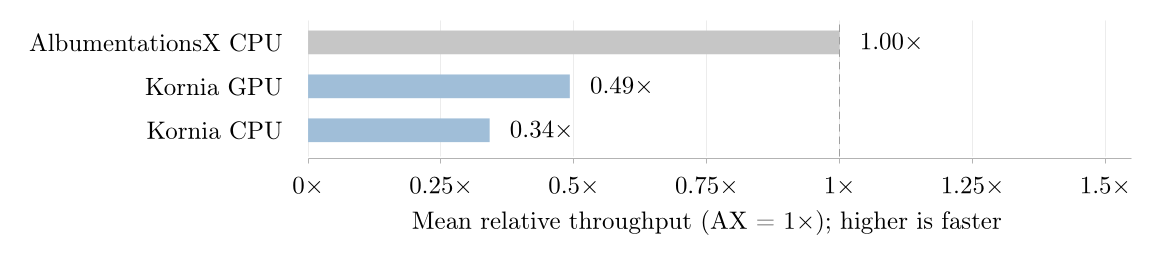
| Measured path | Throughput / AX | GPU memory (MiB) |
|---|---|---|
| AlbumentationsX CPU | 1.00× | 1,852 |
| Kornia GPU | 0.49× | 1,926 |
| Kornia CPU | 0.34× | 1,776 |
Each comparison uses its own shared recipe set. Averages from different sets cannot rank all libraries. The table below includes every measured recipe for these paths, including recipes outside the summary set. Recipe names are shortened; hover over a name for its full pipeline.
Higher throughput is better. Values are medians across seeds. Hover for the observed range. A dash means no measured result.
| R01Resize224 | 4,751 | 2,063 | 1,990 |
|---|---|---|---|
| R02RandomCrop224 | 4,740 | 2,073 | 2,107 |
| R03RandomResizedCrop | 4,785 | 1,776 | 1,746 |
| R04HorizontalFlip | 4,723 | 2,011 | 2,084 |
| R05VerticalFlip | 4,907 | 1,980 | 2,151 |
| R06Pad+RandomCrop224 | 4,397 | — | — |
| R07Rotate | 3,352 | 1,466 | 2,122 |
| R08Affine | 3,049 | 1,445 | 2,138 |
| R09Perspective | 2,879 | 1,303 | — |
| R10Elastic | 1,990 | 102 | 271 |
| R11ColorJitter | 3,523 | 1,006 | 2,047 |
| R12ChannelShuffle | 5,026 | 1,944 | 2,120 |
| R13Grayscale | 5,157 | 1,892 | 2,113 |
| R14RGBShift | 4,348 | 1,889 | 2,149 |
| R15GaussianBlur | 4,679 | 1,189 | 2,155 |
| R16GaussianNoise | 3,288 | 1,662 | 2,022 |
| R17Invert | 5,076 | 1,920 | 2,167 |
| R18Posterize | 5,110 | 1,751 | 2,135 |
| R19Solarize | 4,607 | 1,655 | 2,142 |
| R20Sharpen | 4,223 | 1,241 | 2,144 |
| R21AutoContrast | 4,263 | 1,697 | 2,092 |
| R22Equalize | 3,986 | 1,265 | 523 |
| R23Erasing | 4,938 | 1,558 | — |
| R24JpegCompression | 4,232 | 684 | 2,151 |
| R25RandomGamma | 4,969 | 1,686 | 2,114 |
| R26PlankianJitter | 4,538 | 1,857 | 2,125 |
| R27MedianBlur | 3,805 | 124 | 1,015 |
| R28MotionBlur | 4,223 | 1,210 | 2,127 |
| R29CLAHE | 2,373 | 692 | 104 |
| R30Brightness | 4,622 | 1,872 | 2,101 |
| R31Contrast | 4,642 | 1,868 | 2,092 |
| R32Blur | 4,821 | 1,284 | 2,147 |
| R33ChannelDropout | 4,972 | 1,911 | 2,084 |
| R34LinearIllumination | 3,866 | 1,698 | — |
| R35CornerIllumination | 4,090 | 1,481 | — |
| R36GaussianIllumination | 3,930 | 1,492 | 247 |
| R37Hue | 4,274 | 1,126 | 2,100 |
| R38PlasmaBrightness | 2,461 | 469 | 2,083 |
| R39PlasmaContrast | 2,162 | 477 | 2,103 |
| R40PlasmaShadow | 2,489 | 832 | 2,123 |
| R41Rain | 4,069 | 1,455 | 517 |
| R42SaltAndPepper | 4,147 | 1,479 | 437 |
| R43Saturation | 4,136 | 1,124 | 2,083 |
| R44Snow | 3,857 | 1,131 | 2,059 |
| R45OpticalDistortion | 3,110 | 1,433 | 2,100 |
| R46Shear | 2,658 | 1,508 | — |
| R47ThinPlateSpline | 858 | 696 | 2,121 |
| R48PhotoMetricDistort | 3,369 | — | — |
| R49ColorJiggle | 3,526 | 758 | 2,106 |
| R50LongestMaxSize+RandomCrop224 | 3,658 | 1,073 | 1,066 |
| R51SmallestMaxSize+RandomCrop224 | 3,221 | 845 | 834 |
| R52Transpose | 4,942 | — | — |
| R53RandomRotate90 | 5,002 | 1,462 | 2,106 |
| R54RandomJigsaw | 4,662 | 1,751 | 2,117 |
| R55EnhanceEdge | 4,389 | — | — |
| R56EnhanceDetail | 4,720 | — | — |
| R57UnsharpMask | 3,120 | — | — |
Measurement setup and limits
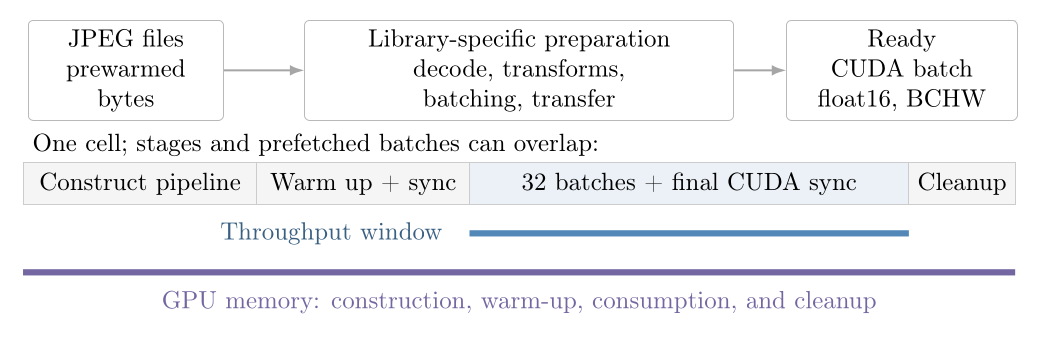
g2-standard-16, nvidia-l4; 10,000 selected ImageNet JPEGs. Batch size 256, 15 workers, prefetch factor 2; persistent workers enabled. Output: cuda float16, BCHW 256×3×224×224.
Seeds: 137, 138, 139. Each observation follows 1 warm-up batch and times 32 batches, ending with CUDA synchronization. Pipeline construction and worker startup are outside throughput timing; prefetch effects remain. JPEG files are prewarmed, so this measures filesystem reads and decoding with a warm page cache.
NVML samples peak process GPU memory every 50 ms, from pipeline construction through final synchronization and cleanup. Brief peaks can be missed. The measurements include no model and do not establish training speed or augmentation quality. Seeds do not guarantee identical augmentation draws across libraries. Observed ranges describe variation between runs; they are not confidence intervals.
In this published run, DALI Crop includes resizing the short side, and DALI Affine omits rotation and shear.
Run 3f8e2e315710528399b8e82e2359ab85c58c809644595b68a92fb9d83492cc8c · 759 measurements · measured source 5fc35f6 · machine-readable results · paper and methodology. This is the run reported in the paper.
Conversion Guide
The conversion usually moves augmentation from tensor batches in the training step into the Dataset/DataLoader preprocessing path.
- Apply AlbumentationsX before converting the sample to a tensor.
- Use ToTensorV2 at the end of the pipeline if the model expects PyTorch tensors.
- Move per-batch GPU-only transforms to AlbumentationsX only when they do not require differentiability or batched tensor semantics.
- Keep Kornia for model-integrated or differentiable computer vision operations.
import kornia.augmentation as K
import torch.nn as nn

augment = nn.Sequential(
    K.RandomHorizontalFlip(p=0.5),
    K.ColorJitter(brightness=0.2, contrast=0.2, p=0.5),
)

batch = augment(batch)import albumentations as A
from albumentations.pytorch import ToTensorV2
transform = A.Compose([
A.HorizontalFlip(p=0.5),
A.RandomBrightnessContrast(brightness_limit=0.2, contrast_limit=0.2, p=0.5),
ToTensorV2(),
])
sample = transform(image=image_np)
image = sample["image"]Use AlbumentationsX When
- CPU-side data augmentation before batching.
- Classic supervised CV pipelines with masks, bounding boxes, keypoints, or multiple aligned images.
- Workloads where augmentation speed in the input pipeline matters more than differentiability.
Use Kornia When
- Differentiable image processing inside PyTorch models.
- GPU batched augmentation, especially when the input pipeline is already tensor-native.
- Research code that needs gradients through geometric or photometric image operations.