Oriented Bounding Boxes (OBB)
On this page
- HBB vs OBB
- All 5 Formats for OBB
- Practical Annotation Formats
- Angle Semantics and Conversion Caveats
- BboxParams for OBB
- End-to-End OBB Pipeline
- Transform Support
- Affine + OBB Examples
- Clipping and Filtering OBB
- Common Mistakes
- Where to Go Next?
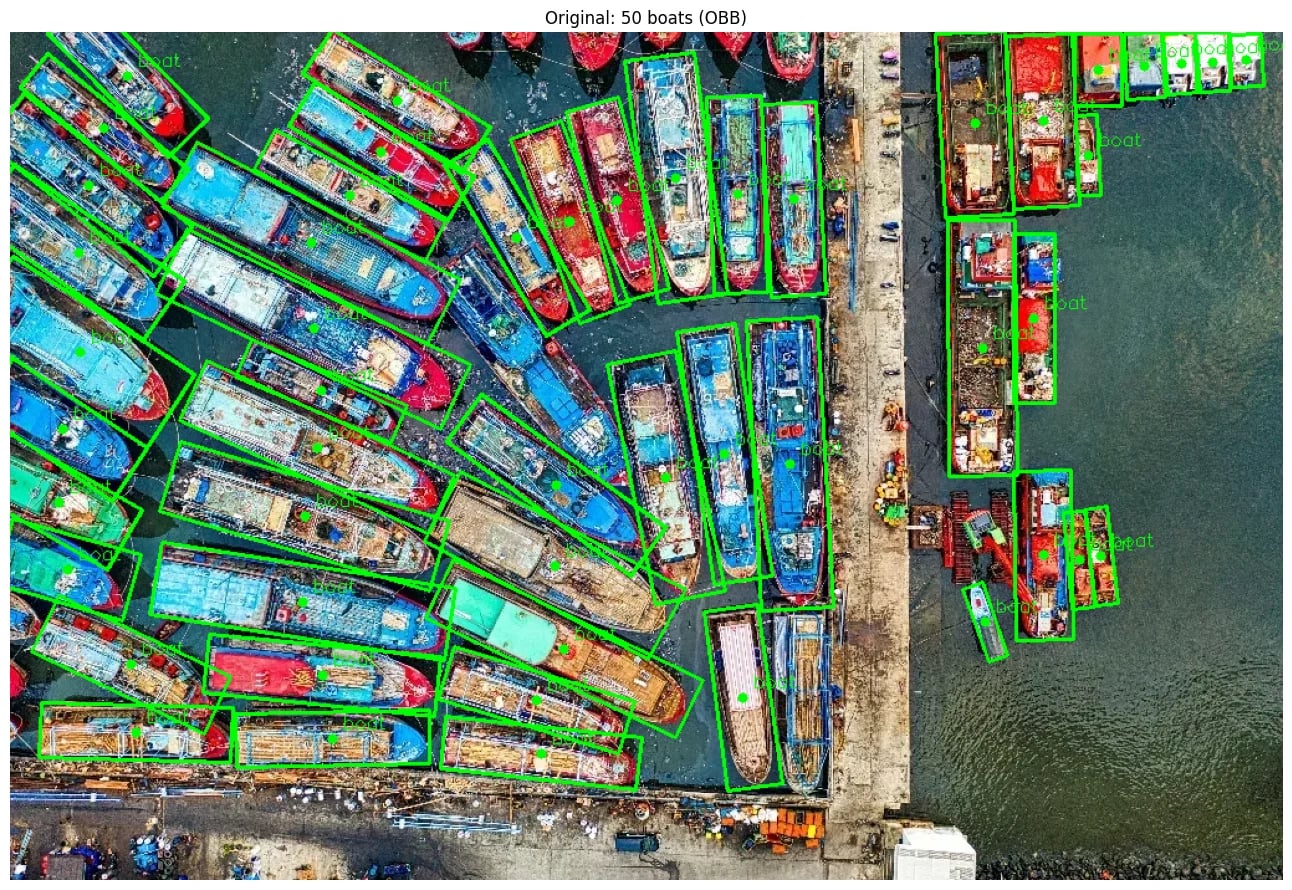
Oriented bounding boxes (OBB) represent oriented objects with a 5th coordinate, the angle, in addition to the 4 coordinates used for axis-aligned boxes (HBB). OBB is useful for aerial imagery, ships, vehicles, OCR, document analysis, industrial inspection, and any scene where object orientation is part of the supervision.
The important point is not only that OBB draws a tighter rectangle. OBB keeps structured supervision aligned with the image after crops, flips, affine transforms, and filtering. If the image rotates but the target representation cannot rotate with it, the model receives a valid-looking annotation for the wrong geometry.
HBB vs OBB
- HBB (axis-aligned): 4 coordinates such as
[x_min, y_min, x_max, y_max]. The box edges stay parallel to the image axes. - OBB (oriented): 5 coordinates: the same spatial representation plus
angle. The box can rotate with the object and with the sampled transform.
Axis-aligned boxes are often enough for upright objects. They become weak supervision when the object is long, thin, dense, or strongly rotated:
- Ships and aerial vehicles: A large HBB around a diagonal ship contains water, dock, or nearby ships. An OBB follows the hull.
- OCR and document text: A slanted word may occupy only a small part of its HBB. OBB preserves the text line orientation.
- Industrial parts: A rotated tool, circuit component, or defect can overlap neighboring parts in HBB space even when the physical object is separate.
- Dense aerial scenes: HBBs around angled cars or roofs overlap heavily, which makes assignment and non-maximum suppression harder.
All 5 Formats for OBB
All coordinate formats supported for HBB also work for OBB. Append angle as the 5th coordinate:
| Format | HBB | OBB |
|---|---|---|
| coco | [x_min, y_min, w, h] | [x_min, y_min, w, h, angle] |
| pascal_voc | [x_min, y_min, x_max, y_max] | [x_min, y_min, x_max, y_max, angle] |
| albumentations | [x_min, y_min, x_max, y_max] normalized | [x_min, y_min, x_max, y_max, angle] |
| yolo | [cx, cy, w, h] normalized | [cx, cy, w, h, angle] |
| cxcywh | [cx, cy, w, h] pixels | [cx, cy, w, h, angle] |
Pick the format that matches your source annotations. If your annotation tool exports center coordinates and size in pixels, use coord_format='cxcywh'. If it exports normalized center coordinates and size, use coord_format='yolo'. If it exports corners or polygons, convert those rows before passing them to Albumentations.
Practical Annotation Formats
Center, Size, Angle Rows
Many OBB datasets store one row per object:
class_id, center_x, center_y, width, height, angle_degrees
Use the coordinate columns as bboxes and keep the class IDs in label_fields:
import albumentations as A
import numpy as np

bboxes = np.array(
    [
        [94.9, 35.1, 45.0, 138.5, -44.2],
        [256.0, 210.0, 96.0, 38.0, 12.0],
    ],
    dtype=np.float32,
)
labels = np.array(["ship", "vehicle"])

bbox_params = A.BboxParams(
    coord_format="cxcywh",
    bbox_type="obb",
    label_fields=["labels"],
)
Normalized YOLO-Style Rows
For normalized center coordinates, use coord_format='yolo' and keep angle in degrees:
bboxes = np.array(
    [
        [0.42, 0.51, 0.18, 0.07, -32.0],
        [0.66, 0.38, 0.12, 0.05, 15.0],
    ],
    dtype=np.float32,
)

bbox_params = A.BboxParams(
    coord_format="yolo",
    bbox_type="obb",
    label_fields=["labels"],
)
The first four values are normalized to [0, 1]; the angle is still an angle in degrees, not a normalized value.
Four Corners or Polygon Rows
Some tools export four vertices instead of center, size, and angle. Convert those points to an OBB first. A robust conversion can use cv2.minAreaRect to recover the rectangle corners, then derive width, height, and angle from those corners:
import cv2
import numpy as np


def wrap_obb_angle(angle: float) -> float:
    """Wrap angle in degrees to [-90, 90)."""
    angle = angle % 360.0
    if angle >= 180.0:
        angle -= 360.0
    if angle >= 90.0:
        angle -= 180.0
    elif angle < -90.0:
        angle += 180.0
    return angle


def polygon_to_obb(points: list[list[float]]) -> list[float]:
    """Convert 4 polygon points to [cx, cy, width, height, angle]."""
    contour = np.asarray(points, dtype=np.float32)
    rect = cv2.minAreaRect(contour)
    corners = cv2.boxPoints(rect)

    edge1 = corners[1] - corners[0]
    edge2 = corners[2] - corners[1]
    length1 = float(np.linalg.norm(edge1))
    length2 = float(np.linalg.norm(edge2))
    angle1 = wrap_obb_angle(float(np.degrees(np.arctan2(edge1[1], edge1[0]))))
    angle2 = wrap_obb_angle(float(np.degrees(np.arctan2(edge2[1], edge2[0]))))

    if abs(angle1) <= abs(angle2):
        width, height, angle = length1, length2, angle1
    else:
        width, height, angle = length2, length1, angle2

    return [
        float(corners[:, 0].mean()),
        float(corners[:, 1].mean()),
        float(width),
        float(height),
        float(angle),
    ]


polygon = [[72, 28], [108, 0], [178, 92], [142, 120]]
obb = polygon_to_obb(polygon)
This conversion follows the same convention Albumentations uses internally: cv2.minAreaRect supplies the rectangle corners, but the final width, height, and angle are derived from the corner edges. Do not treat polygon conversion as a blind file-format migration. Polygon vertex order, angle direction, and width/height conventions vary across datasets. Visualize a batch of converted annotations before training.
Custom CSV or JSON Records
For custom data, normalize the records into two objects before augmentation:
bboxes: an array with shape(num_boxes, 5)for the OBB coordinates.- one or more label fields such as
labels,track_ids,difficult_flags, orinstance_ids.
When a box is dropped by clipping or filtering, every field listed in label_fields is filtered in the same way. That synchronization is part of the structured-supervision contract.
Angle Semantics and Conversion Caveats
The angle value is the rotation of the OBB width edge from the image horizontal axis, in degrees, wrapped to [-90, 90).
More precisely:
- The reference direction is the positive image x-axis: left to right across the image.
- The angle is attached to the
widthedge, not necessarily the longer edge. - At
0°, the width edge is horizontal. - Because image coordinates have
yincreasing downward, positive OBB angles rotate clockwise on the displayed image. Negative angles rotate counter-clockwise. - Albumentations stores the canonical representation where
widthis the edge more parallel to the horizontal axis andheightis the other edge.
This matches the internal OBB conversion code: Albumentations converts OBB rows to corners with an OpenCV-compatible rectangle construction, and converts polygons back by choosing the edge with smaller absolute angle from horizontal as width.
Use these checks when importing annotations:
- Degrees vs radians: Albumentations expects degrees. Convert radians before building
bboxes. - Clockwise vs counter-clockwise: If your dataset defines the opposite angle direction, multiply the angle by
-1and visualize the result. - Width-edge vs long-side angle: Some datasets define the angle of the longer side. Albumentations stores the angle for the width field. If your import code swaps width and height, it must also adjust the angle by 90 degrees.
- Angle wrapping: Equivalent rectangles can be written with angles that differ by 180 degrees. Wrap angles into
[-90, 90)before passing them to the pipeline. - Visual validation: Format errors are often numerically valid. Always draw a few original and augmented samples before starting a training run.
A small helper keeps imported angles in the expected range:
def wrap_obb_angle(angle: float) -> float:
    """Wrap angle in degrees to [-90, 90)."""
    angle = angle % 360.0
    if angle >= 180.0:
        angle -= 360.0
    if angle >= 90.0:
        angle -= 180.0
    elif angle < -90.0:
        angle += 180.0
    return angle
If your source format stores the long side as the angle-bearing side but your output row stores that side as width, make the width/height swap explicit:
def long_side_to_width_edge(width: float, height: float, angle: float) -> tuple[float, float, float]:
    if height > width:
        width, height = height, width
        angle = wrap_obb_angle(angle + 90.0)
    else:
        angle = wrap_obb_angle(angle)

    return width, height, angle
This is a conversion example, not a universal rule. Use the rule that matches your dataset's annotation specification.
BboxParams for OBB
Set bbox_type='obb' and choose your coord_format:
import albumentations as A

bbox_params = A.BboxParams(
    coord_format="cxcywh",
    bbox_type="obb",
    label_fields=["labels"],
)

transform = A.Compose(
    [
        A.Affine(scale=(0.9, 1.1), rotate=(-15, 15), shear=(-5, 5), p=0.9),
        A.HorizontalFlip(p=0.5),
    ],
    bbox_params=bbox_params,
    seed=137,
)
End-to-End OBB Pipeline
This example combines a crop, affine geometry, a pixel-level transform, OBB labels, and filtering:
import albumentations as A
import cv2
import numpy as np

image = cv2.imread("image.jpg")
image = cv2.cvtColor(image, cv2.COLOR_BGR2RGB)

bboxes = np.array(
    [
        [94.9, 35.1, 45.0, 138.5, -44.2],
        [256.0, 210.0, 96.0, 38.0, 12.0],
    ],
    dtype=np.float32,
)
labels = ["ship", "vehicle"]

transform = A.Compose(
    [
        A.RandomCrop(width=512, height=512, p=1.0),
        A.Affine(scale=(0.9, 1.1), rotate=(-20, 20), shear=(-5, 5), p=0.9),
        A.RandomBrightnessContrast(p=0.2),
    ],
    bbox_params=A.BboxParams(
        coord_format="cxcywh",
        bbox_type="obb",
        label_fields=["labels"],
        filter_invalid_bboxes=True,
        min_area=16,
        min_visibility=0.2,
    ),
    seed=137,
)

result = transform(image=image, bboxes=bboxes, labels=labels)

augmented_image = result["image"]
augmented_bboxes = result["bboxes"]
augmented_labels = result["labels"]
The output may contain fewer boxes than the input. A crop can remove an object, or filtering can drop a box that becomes too small or insufficiently visible. Your dataset code should handle empty augmented_bboxes, especially when using aggressive crops.
Transform Support
Most Dual transforms support OBB, including Affine, Rotate, HorizontalFlip, and VerticalFlip. Check the Supported Targets by Transform reference for details. If a transform does not support OBB, the pipeline will raise an error at initialization.
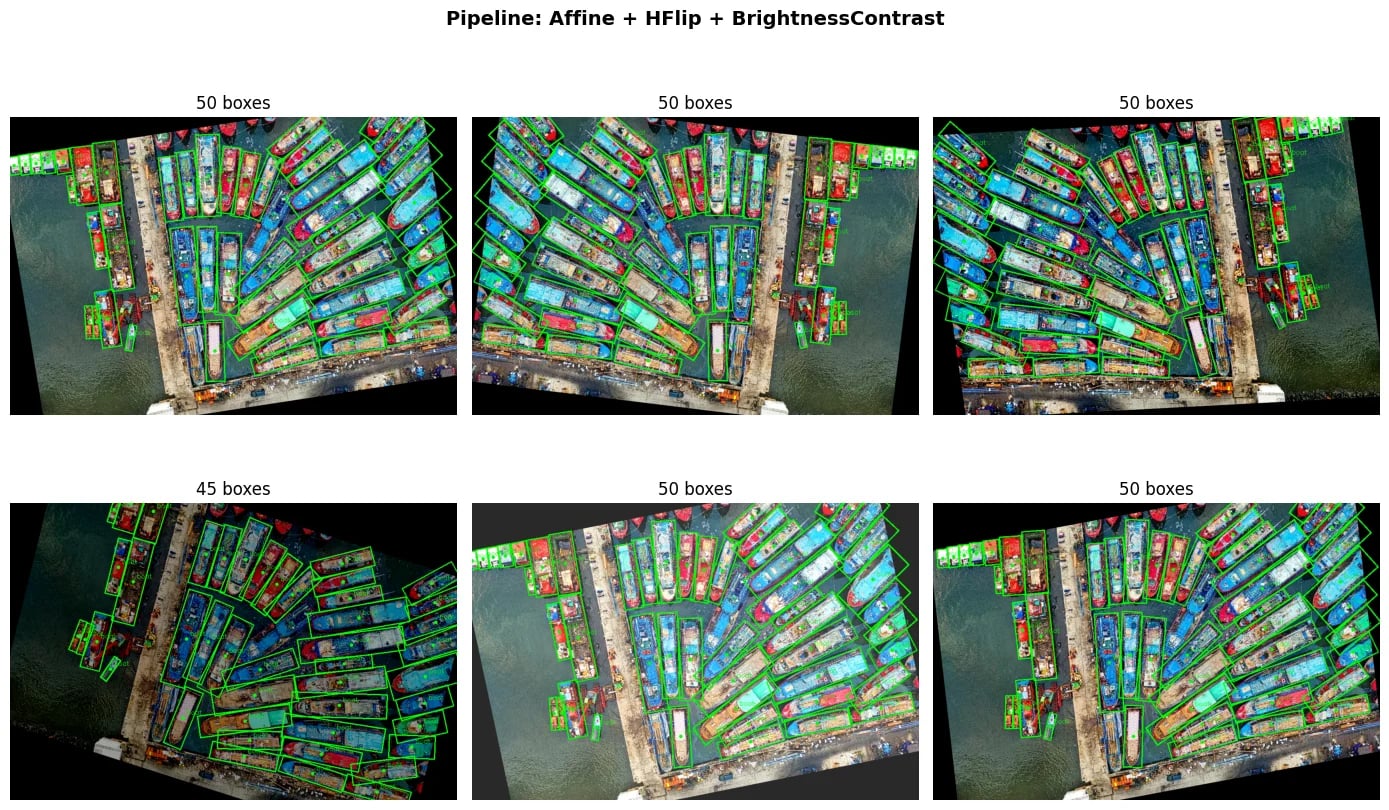
Pixel-level transforms such as RandomBrightnessContrast change the image but leave OBB coordinates untouched. Spatial transforms update both the image and the OBB target. This shared-parameter behavior is what keeps structured supervision aligned.
Affine + OBB Examples
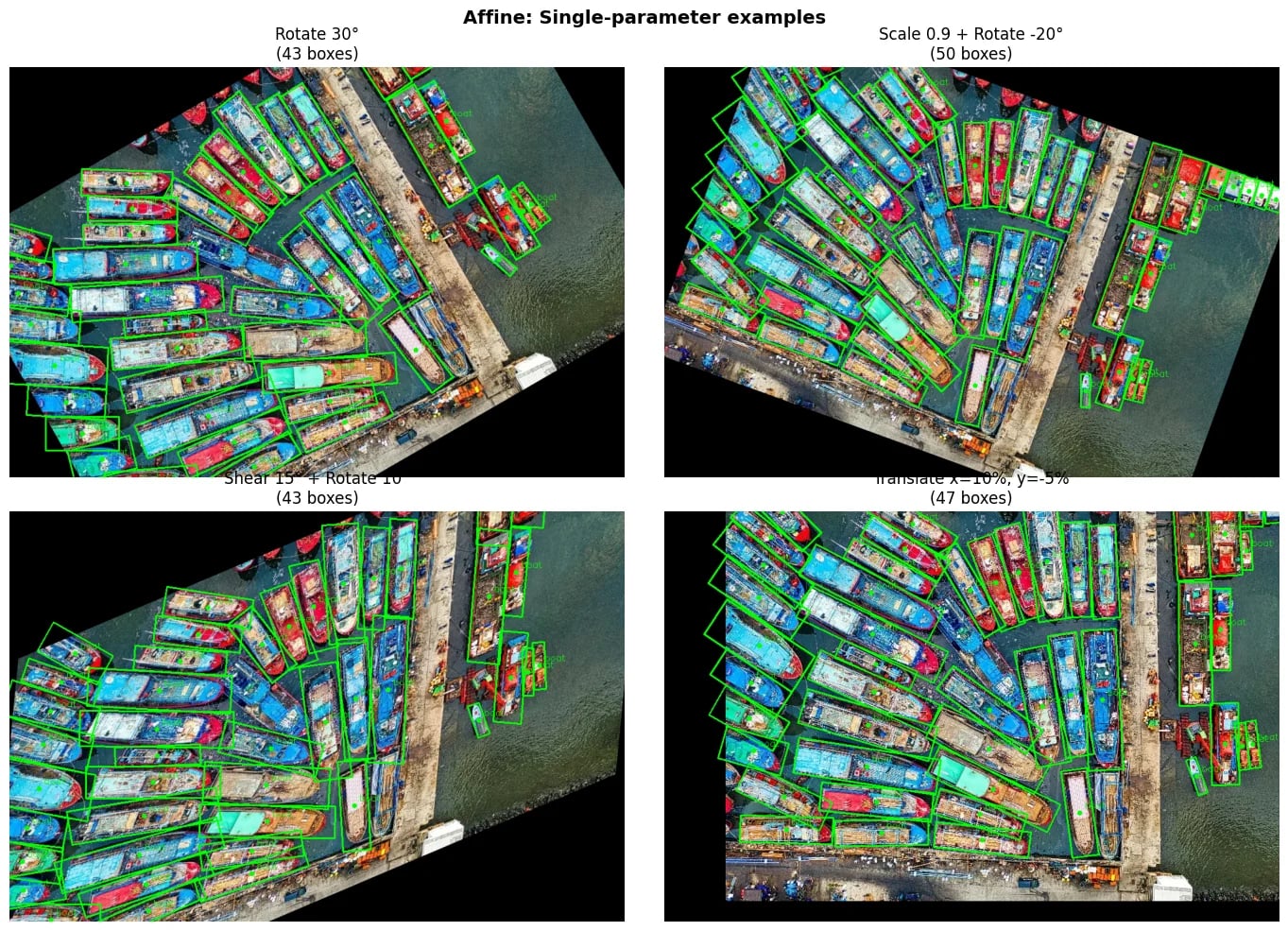
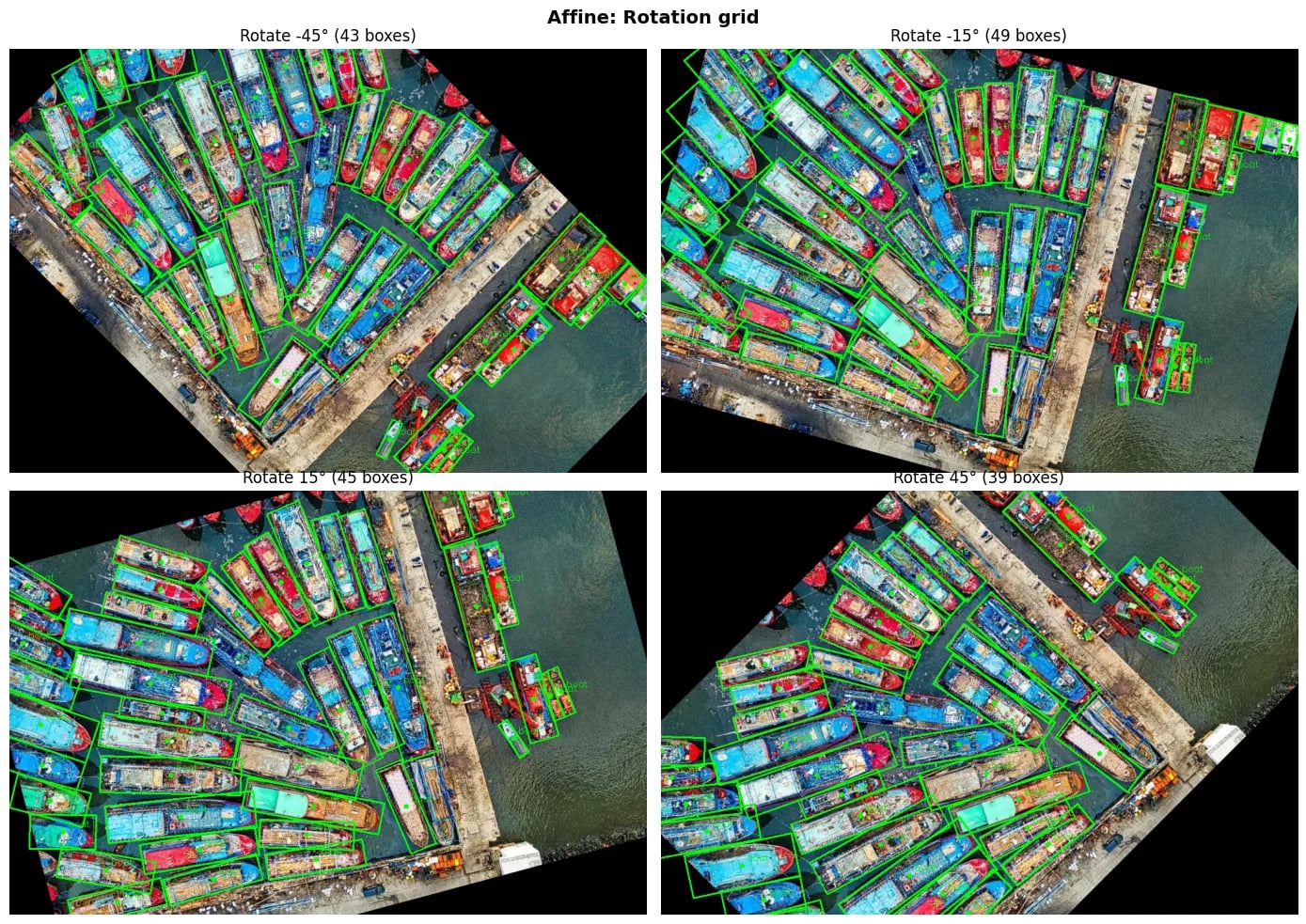
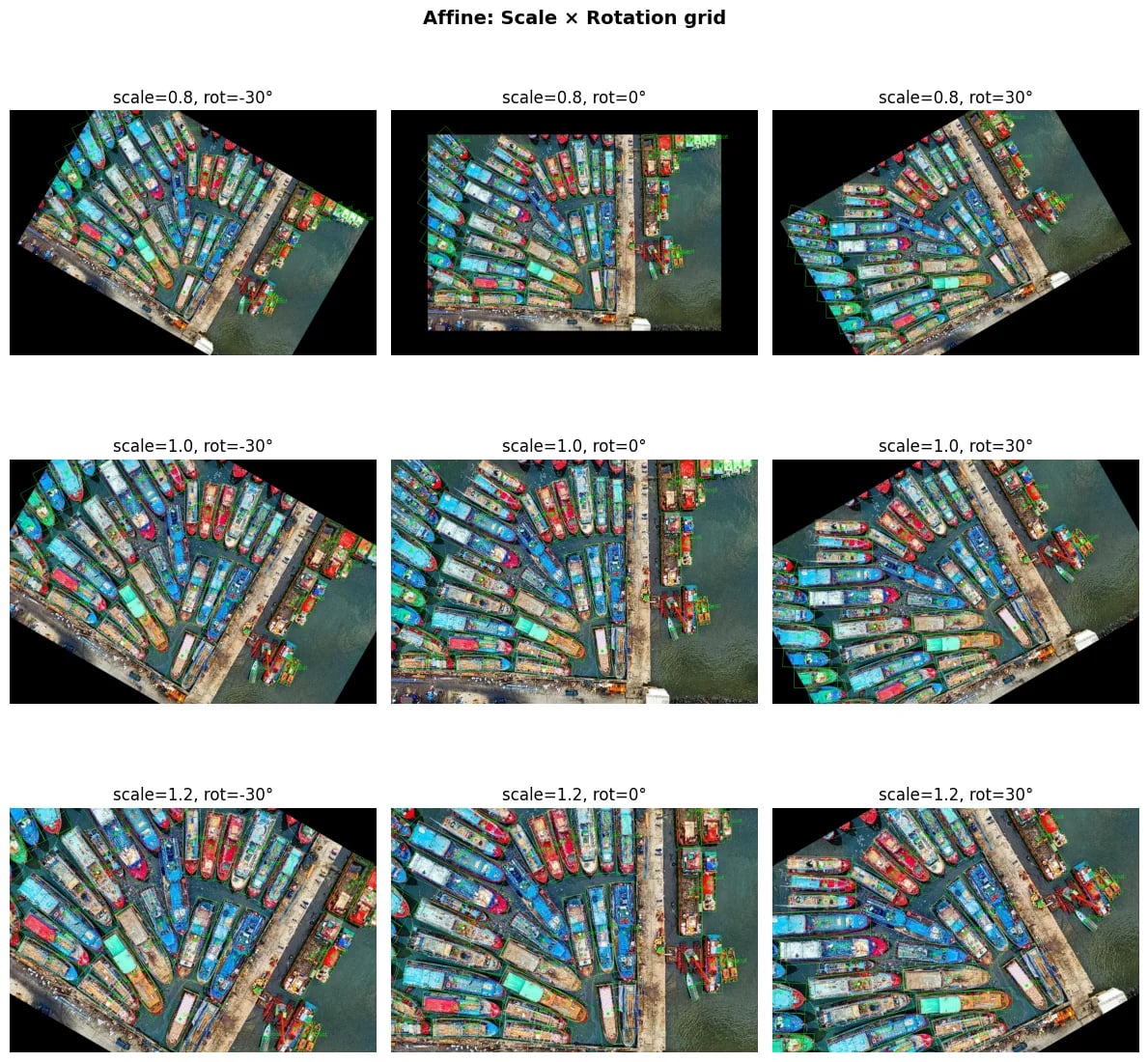
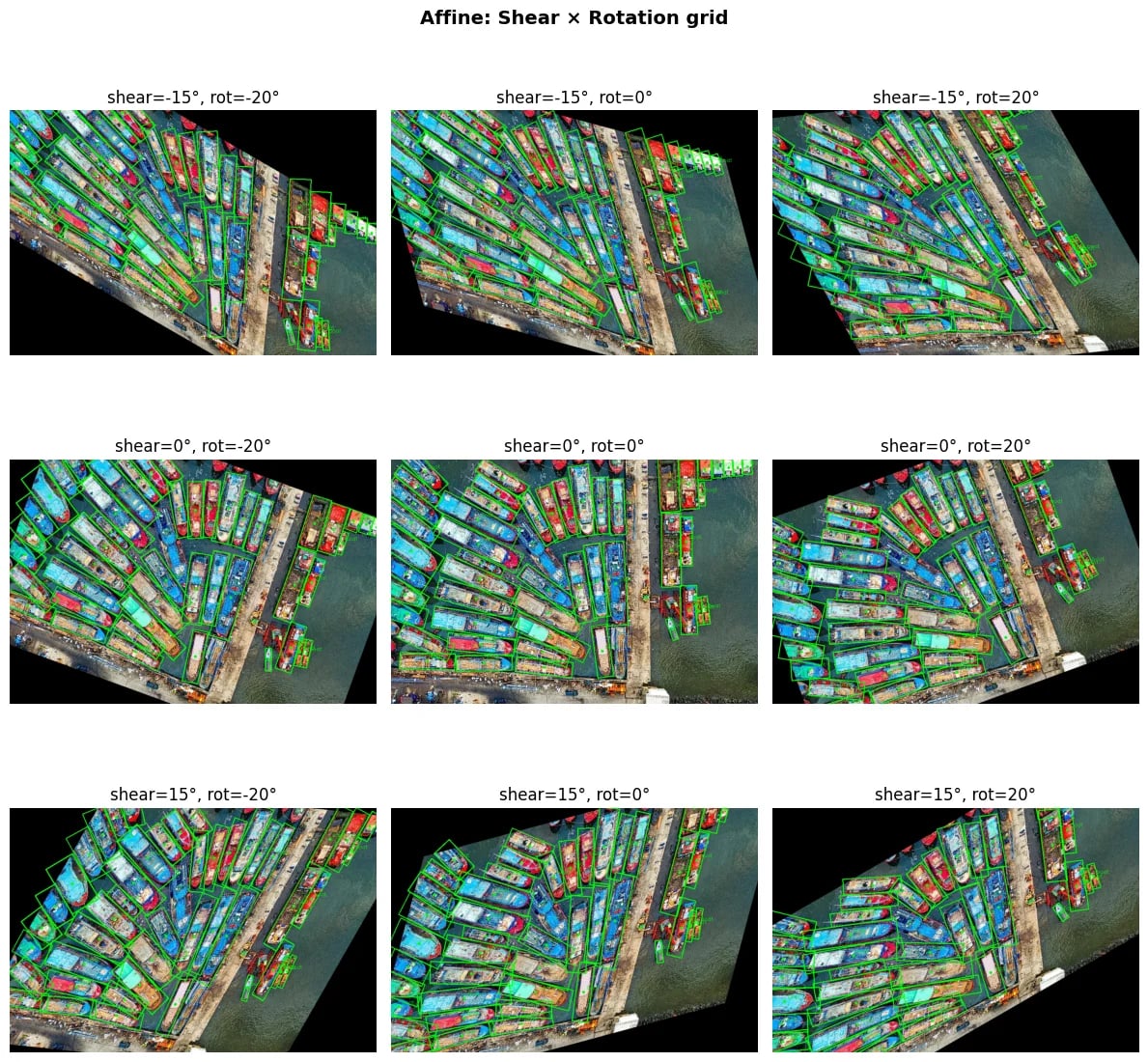
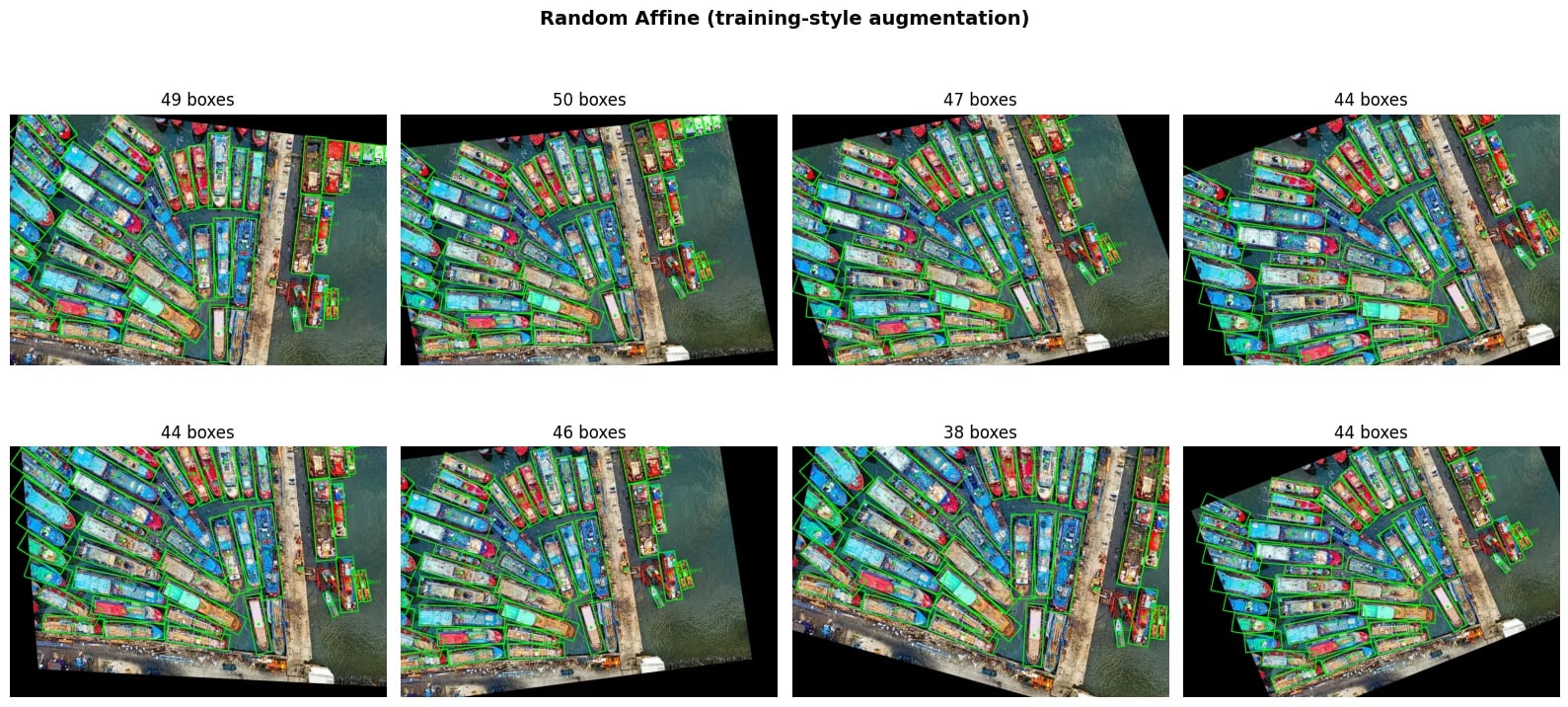
Affine supports scale, translate, rotate, and shear, all of which correctly transform OBB angles.
Clipping and Filtering OBB
OBB clipping deserves more care than HBB clipping because a rotated rectangle can cross the image boundary with only one or two corners outside. Clipping the visible polygon back into the image can change the shape, and the rectangular OBB returned after clipping may no longer preserve the original orientation.
A.BboxParams exposes the same filtering controls used for HBB:
bbox_params = A.BboxParams(
    coord_format="cxcywh",
    bbox_type="obb",
    label_fields=["labels"],
    clip_bboxes_on_input=False,
    clip_after_transform=True,
    filter_invalid_bboxes=True,
    min_area=16,
    min_visibility=0.2,
)
Use these settings deliberately:
clip_bboxes_on_input: Clips boxes to image bounds once before the pipeline. For OBB this can be lossy because a partly outside rotated box may be converted to a wrapping axis-aligned box withangle=0. Keep the defaultFalseunless your input annotations are known to be messy and you prefer cleanup over preserving the original OBB.clip_after_transform: Clips after each transform. For OBB, this clips the rotated corners and returns a wrapping box for the visible part. The default isTrue. Set it toFalseonly if your downstream code can tolerate boxes temporarily leaving the image.filter_invalid_bboxes: Removes invalid boxes before augmentation. Ifclip_bboxes_on_input=True, filtering happens after input clipping.min_area: Drops boxes whose remaining area is too small after augmentation.min_visibility: Drops boxes when too little of the original object remains visible after a crop or transform.
For training pipelines, a practical default is to keep clip_bboxes_on_input=False, leave clip_after_transform=True, and use conservative min_area or min_visibility thresholds. For dataset cleanup, run a separate validation pass where you visualize invalid or out-of-frame annotations instead of silently changing all training labels.
Common Mistakes
Using HBB for rotated objects. The training job runs, but the target includes background, neighboring instances, or the wrong orientation. Use OBB when orientation is part of the object geometry.
Mixing angle conventions. Radians, clockwise-positive angles, long-side angles, and width-edge angles can all produce plausible numbers. Convert explicitly and visualize.
Forgetting bbox_type='obb'. A 5-column array is only interpreted as OBB when bbox_type='obb' is set in A.BboxParams.
Assuming clipping is harmless. Clipping a rotated rectangle can change the represented geometry. Use clipping and filtering thresholds as part of the training policy, not as an unnoticed preprocessing detail.
Ignoring empty outputs. Aggressive crops can remove every OBB from a sample. Your training dataset should skip, resample, or otherwise handle empty targets.
Where to Go Next?
- Bounding Box Augmentation: Core HBB guide and format details
- Supported Targets by Transform: Which transforms support OBB
- Choosing Augmentations: Selecting effective augmentations